


목 차![down-arrow]()


〈
Django Query 향상시키기
2023.04.07.


Query 향상시키기
1. Improve Query
- 같은 결과에 대한
쿼리 개수를 줄여서조회하기 (최적화 조회) - 최적화를 위해 고민하는 것은 도움이 되나 오히려 섣부른 최적화는 큰 도움이 안 될 수 있기에
무조건 최적화를 진행하는 것은 지양함
2. annotate
- SQL의
GROUP BY절을 활용함
2-1. annotate 예시
- 게시글 목록 조회 시, 댓글 개수도 출력하는 경우
- index 페이지에서 게시글 목록과 각 게시글에 대한 댓글 개수를 함께 출력하는 상황에서 페이지 출력을 최적화 할 수 있음
- 기존에는 각 게시글 별 댓글 개수를
반복 평가했었음
<!--articles/index.html-->

{% for article in articles %}
...
<p>댓글 개수 : {{ article.comment_set.all }}</p>
{% endfor %}
- view 함수에서 annotate 사용
- annotate를 사용하여 첫 조회 시, 댓글의 개수까지 한 번에 context에 담아서 전달
# articles/views.py

def index(request):
    # articles = Article.objects.order_by('-pk')
    articles = Article.objects.annotate(Count('comment')).order_by('-pk')
    context = {
        'articles': articles,
    }
    return render(request, 'articles/index.html', context)
<!--articles/index.html-->
{% for article in articles %}
...
<p>댓글 개수 : {{ article.comment__count }}</p>
{% endfor %}- 이를 통해 게시글 목록 당 댓글 개수만큼 쿼리했던 것을
1 query로 줄임
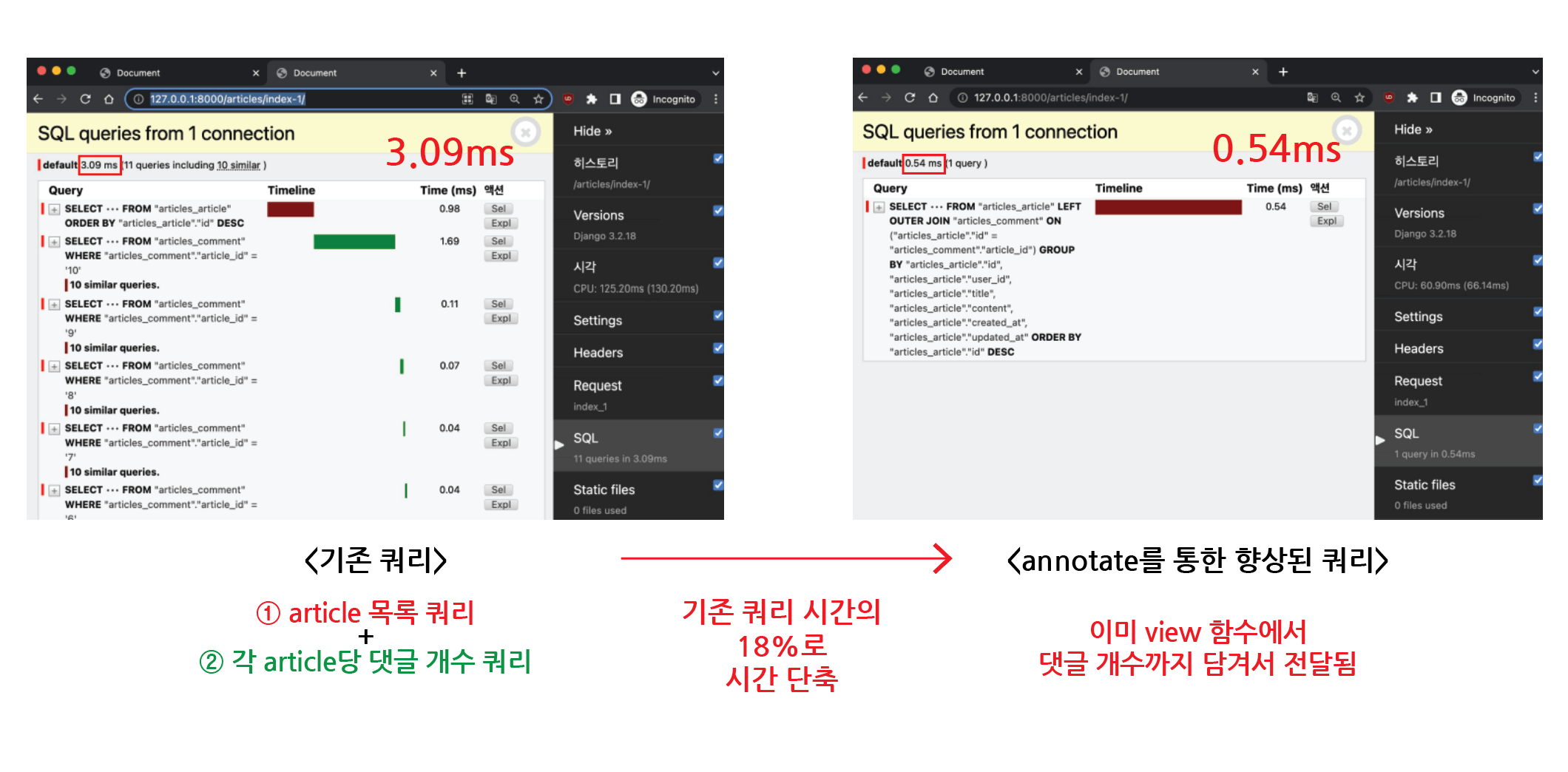
annotate로 향상된 Query
3. select_related
- 1:1 또는 N:1
정참조 관계에서 사용 - SQL의
INNER JOIN절을 활용
3-1. select_related 예시
- 게시글 목록 조회 시, 게시글 작성 유저 이름도 출력하는 경우
- index 페이지에서 게시글 목록과 각 게시글에 작성 유저 이름을 함께 출력하는 상황에서 페이지 출력을 최적화 할 수 있음
- 기존에는 각 게시글 출력 후, 작성 유저 이름을
반복 평가했었음
<!--articles/index.html-->

{% for article in articles %}
<p>작성자 : {{ article.user.username }}</p>
<p>제목 : {{ article.title }}</p>
{% endfor %}
- view 함수에서 select_related 사용
- select_related를 사용하여 article 조회 시, user까지 한 번에 context에 담아서 전달
# articles/views.py

def index(request):
    # articles = Article.objects.order_by('-pk')
    articles = Article.objects.select_related('user').order_by('-pk')
    context = {
        'articles': articles,
    }
return render(request, 'articles/index.html', context)- 이를 통해 게시글 목록 당 유저만큼 쿼리했던 것을
1 query로 줄임
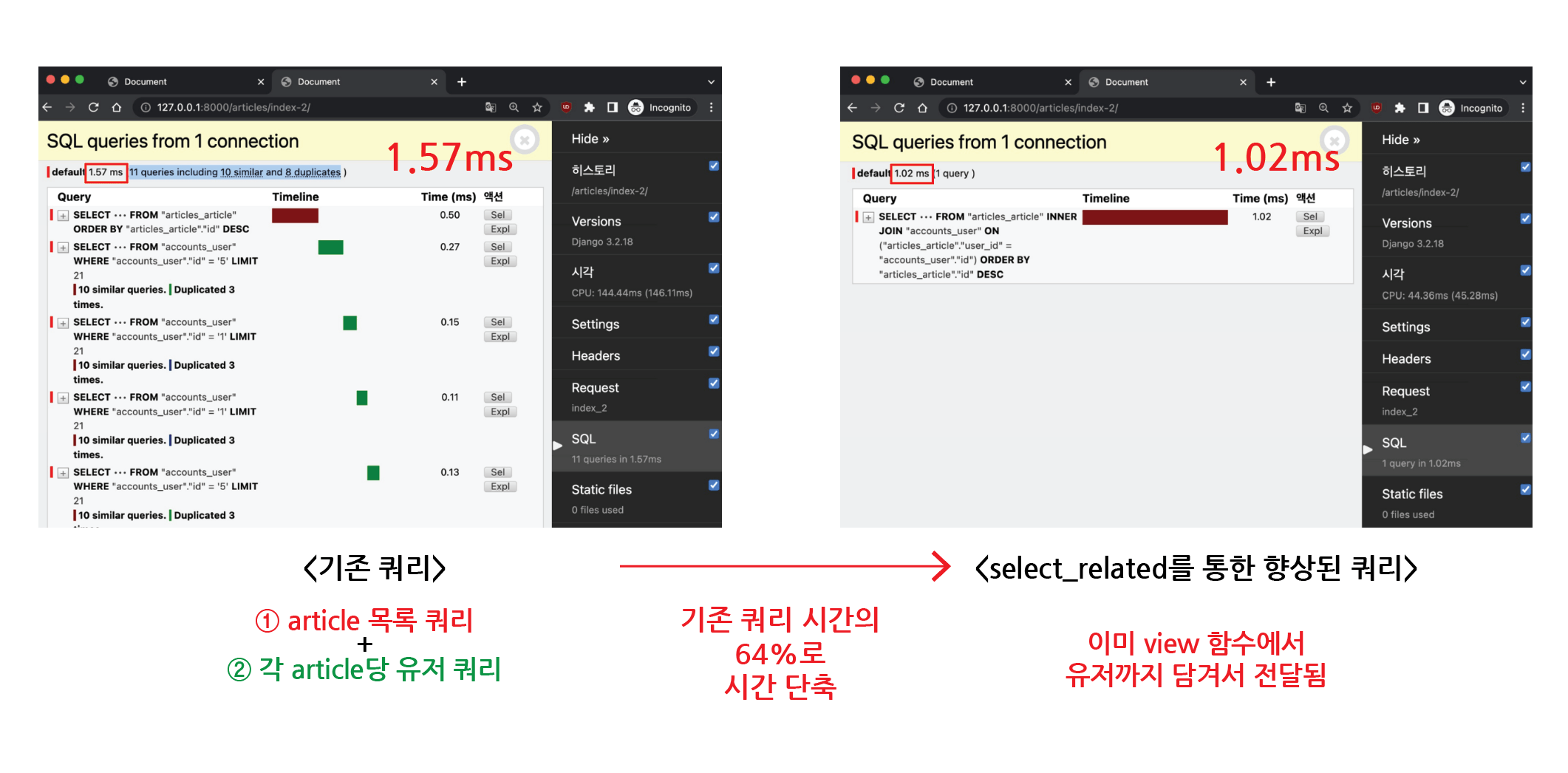
select_related로 향상된 Query
4. prefetch_related
- M:N 또는 N:1
역참조 관계에서 사용 - SQL이 아닌 Python을 사용한
JOIN이 진행됨
4-1. prefetch_related 예시
- 게시글 목록 조회 시, 댓글 목록도 출력하는 경우
- index 페이지에서 게시글 목록과 각 게시글의 댓글 목록을 함께 출력하는 상황에서 페이지 출력을 최적화 할 수 있음
- 기존에는 각 게시글 출력 후, 댓글 목록을
반복 평가했었음
<!--articles/index.html-->

{% for article in articles %}
<p>제목 : {{ article.title }}</p>
<p>댓글 목록</p>
{% for comment in article.comment_set.all %}
<p>{{ comment.content }}</p>
{% endfor %}
<hr>
{% endfor %}
- view 함수에서 prefetch_related 사용
- prefetch_related를 사용하여 article 조회 시, comment까지 한 번에 context에 담아서 전달
# articles/views.py

def index(request):
    # articles = Article.objects.order_by('-pk')
    articles = Article.objects.prefetch_related('comment_set').order_by('-pk')
    context = {
        'articles': articles,
    }
return render(request, 'articles/index.html', context)- 이를 통해 게시글 목록 당 댓글 개수 만큼 쿼리했던 것을
2 query로 줄임
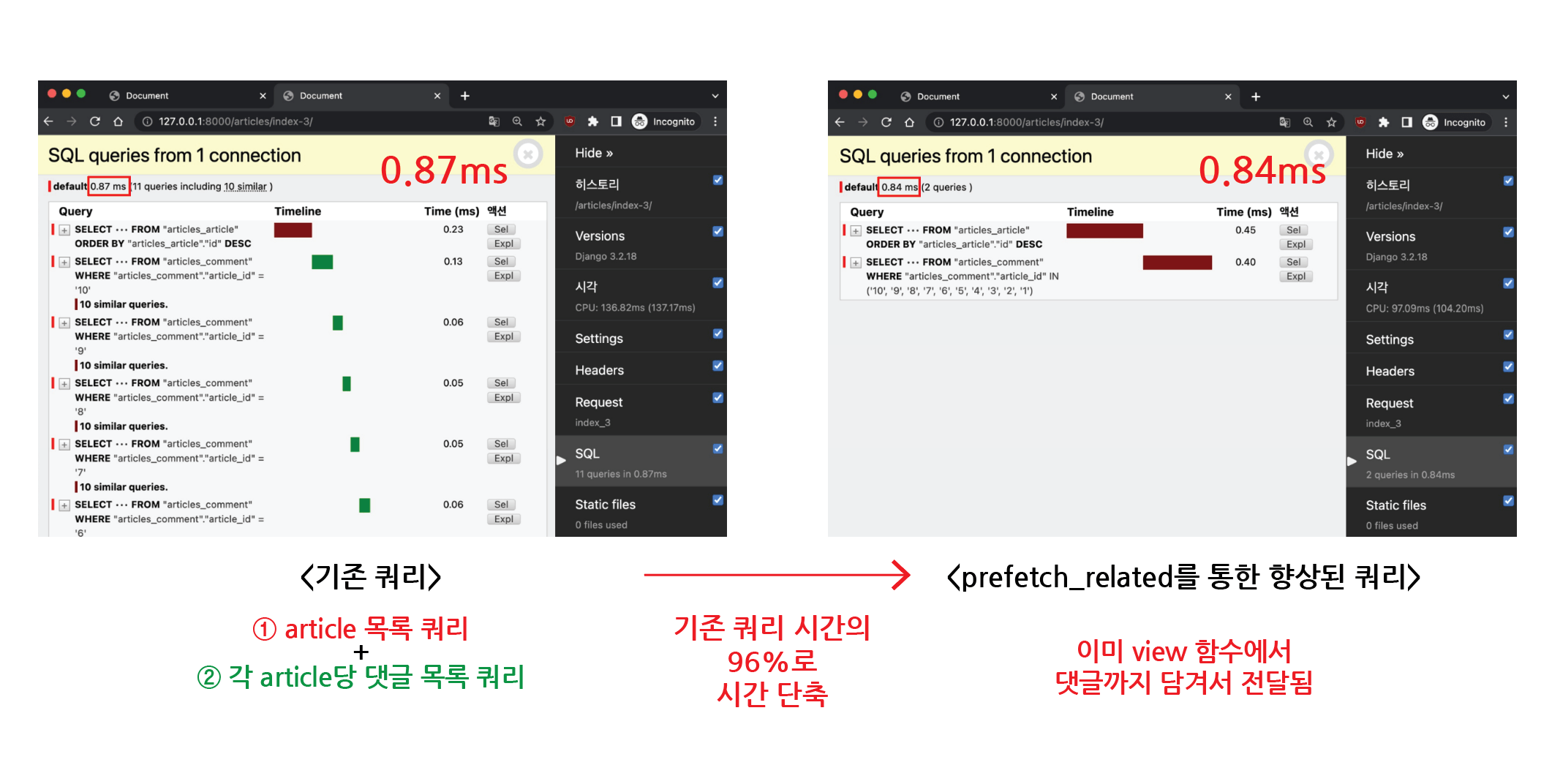
prefetch_related로 향상된 Query
5. selected_related & prefetch_related
5-1. selected_related & prefetch_related 예시
- 게시글 목록 조회 시, 댓글 목록과 각 댓글 작성자도 출력하는 경우
<!--articles/index.html-->

{% for article in articles %}
<p>제목 : {{ article.title }}</p>
<p>댓글 목록</p>
{% for comment in article.comment_set.all %}
<p>{{ comment.user.username }} : {{ comment.content }}</p>
{% endfor %}
<hr>
{% endfor %}
- view 함수에서 select_related & prefetch_related 사용
# articles/views.py

def index(request):
    # articles = Article.objects.order_by('-pk')
    # articles = Article.objects.prefetch_related('comment_set').order_by('-pk')
    articles = Article.objects.prefetch_related(
        Prefetch('comment_set', queryset=Comment.objects.select_related('user'))
    ).order_by('-pk')
    context = {
        'articles': articles,
    }
return render(request, 'articles/index.html', context)- 이를 통해 게시글 목록 당 댓글 개수, 작성자 만큼 쿼리했던 것을
2 query로 줄임
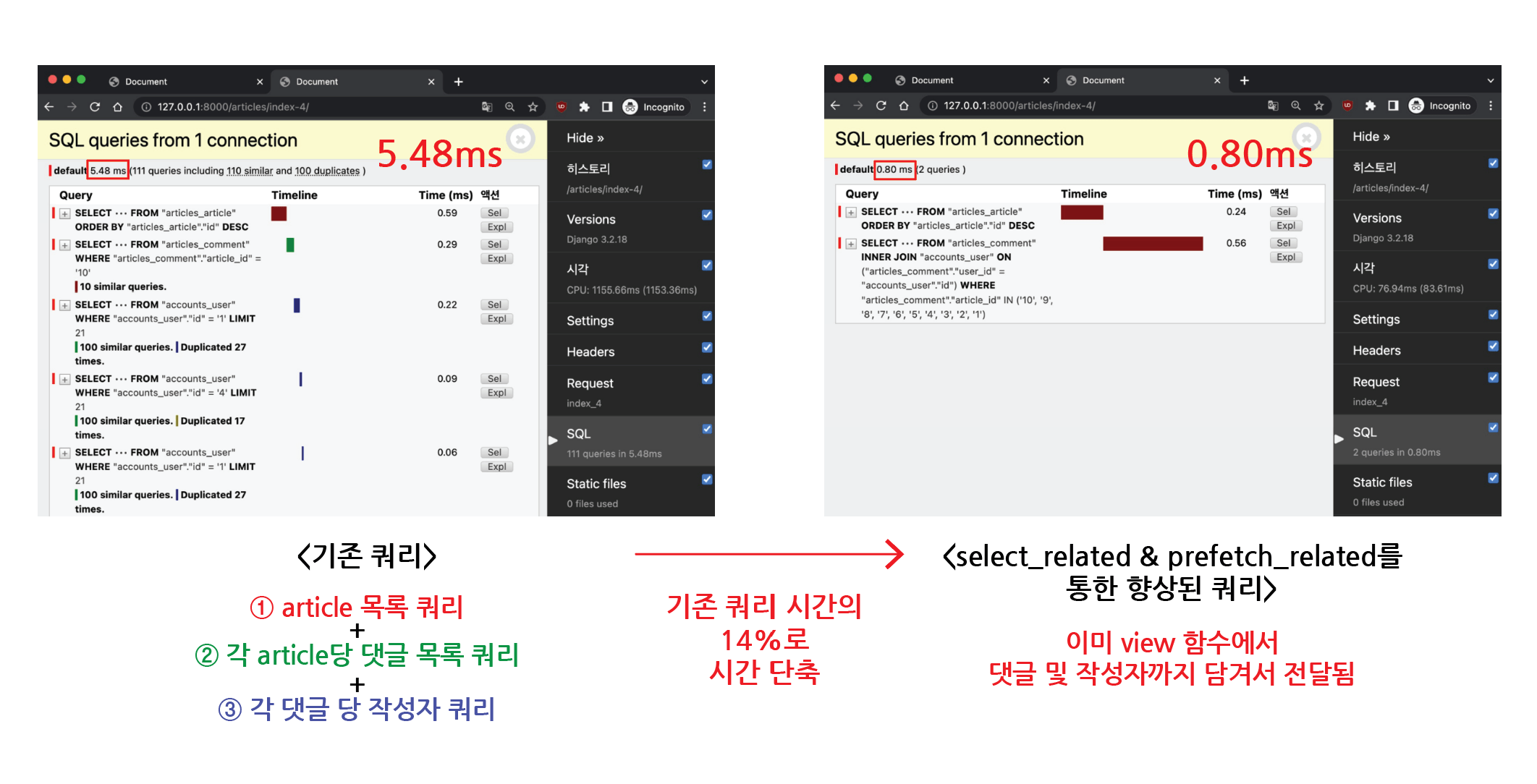
select_related & prefetch_related로 향상된 Query


조정곤
주니어 프론트엔드 개발자


