


목 차![down-arrow]()


〈
Django 정적 파일
2023.03.29.


Static Files
1. Static Files
- 서버 측에서 변경되지 않고
고정적으로 제공되는 파일 - 이미지, JavaScript, CSS 파일 등…
1-1. 웹 서버와 정적 파일
- 웹 서버는 특정 경로(url)에 있는 자원을 요청(HTTP request)을 받아서 응답(HTTP response)을 처리하고 제공하는 것
- 웹 서버는 요청 받은 url로 서버에 존재하는 정적 자원(Static resource)을 제공함
- 즉,
정적 파일을 제공하기 위한경로(url)이 있어야 함
2. Static Files 제공하기
- 경로에 따른 정적 파일 제공하기
| 기본 경로 | 추가 경로 |
|---|---|
| app/static/ | STATICFILES_DIRS |
2-1. 기본 경로 Static File 제공하기
articles/static/articles/경로에 이미지 파일 배치
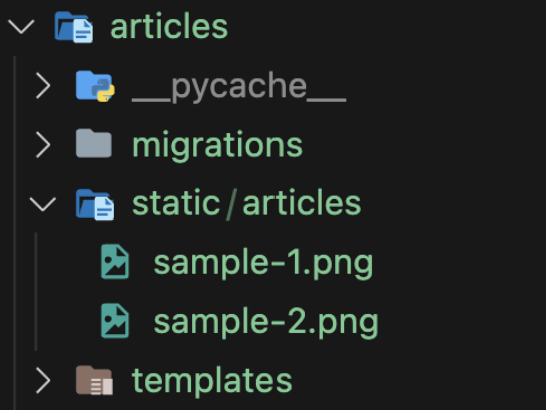
정적 파일 경로 구조(폴더 구조)
2-2. static tag 사용
{% load static %}: static 모듈 가져오기static tag: 정적 파일에 대한 url 제공하기
<!--articles/index.html-->

{% load static %}

<img src="{% static 'articles/sample-1.png' %}" alt="img">
2-3. STATIC_URL 경로
- 기본 경로 및 추가 경로에 위치한 정적 파일을 참조하기 위한 URL
- 즉, 실제 파일이 아니며, URL로만 존재
- 비어있지 않은 값으로 설정한다면 반드시 slash(’/‘)로 끝나야 함
# settings.py

STATIC_URL = '/static/'

STATIC_URL 경로
2-4. 추가 경로 Static File 제공하기
- 추가 경로 설정
STATICFILES_DIR: 정적 파일 기본 경로 이외에추가 경로 목록을 정의하는 리스트
# settings.py

STATICFILES_DIR = [
    BASE_DIR / 'static',
]
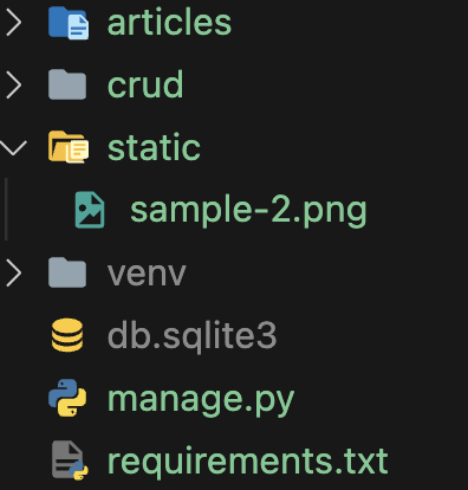
추가 경로의 static files
2-5. 추가 경로 static tag 사용
<!--articles/index.html-->

{% load static %}

<img src="{% static 'sample-2.png' %}" alt="img">
3. Media Files
- 사용자가 웹에서
업로드하는 정적 파일 (user-uploaded)
3-1. ImageField()
- 이미지 업로드에 사용하는 모델 필드
- 이미지 객체가 DB에 직접 저장되는 것이 아닌
이미지 파일의 경로 문자열이 DB에 저장됨
3-2. Media File을 제공하기 전 설정
- settings.py에
MEDIA_ROOT,MEDIA_URL설정 - 작성된 MEDIA_ROOT와 MEDIA_URL에 대한
url 지정
- MEDIA_ROOT
- Media file들이 위치하는 디렉토리 절대 경로
# settings.py

MEDIA_ROOT = BASE_DIR / 'media'
- MEDIA_URL
- MEDIA_ROOT에서 제공되는 Media file에 대한 주소를 생성
- STATIC_URL과 동일한 역할을 함
# settings.py

MEDIA_URL = '/media/'
- MEDIA_ROOT와 MEDIA_URL에 대한 url 지정
# project/urls.py

from django.conf import settings
from django.conf.urls.static import static

urlpatterns = [
                  path('admin/', admin.site.urls),
                  path('articles/', include('articles.urls')),
] + static(settings.MEDIA_URL, document_root=settings.MEDIA_ROOT)settings.MEDIA_URL: 업로드 된 파일의 URLsettings.MEDIA_ROOT: 위 URL을 통해 참조하는 파일의 실제 위치
4. 이미지 업로드 및 제공하기
4-1. 이미지 업로드
- models.py 수정
blank=True속성을 작성하여 빈문자열이 저장될 수 있도록 설정
# articles/models.py

class Article(models.Model):
    title = models.CharField(max_length=10)
    content = models.TextField()
    image = models.ImageField(blank=True)
    created_at = models.DateTimeField(auto_now_add=True)
    updated_at = models.DateTimeField(auto_now=True)
- migration 진행
# pillow 라이브러리 설치
$ pip install pillow

# 마이그레이션 재진행
$ python manage.py makemigrations
$ python manage.py migrate

# 설치된 라이브러리를 requirements.txt에 명시
$ pip freeze > requirements.txt
- pillow
- 이미지 업로드 시, 사용하는
ImageField()를 이용하려면 반드시 필요한라이브러리
- form 요소에 enctype 속성 추가
- form 속성에
enctype="multipart/form-data"추가 - 생성 및 수정 페이지에도 동일하게 적용
<!--articles/create.html-->

<h1>CREATE</h1>
<form action="{% url 'articles:create' %}" method="POST" enctype="multipart/form-data">
  {% csrf_token %}
  {{ form.as_p }}
  <input type="submit">
</form>

<!---------------------------------------------------------------->

<!--articles/update.html-->

<h1>UPDATE</h1>
<form action="{% url 'articles:update' article.pk %}" method="POST" enctype="multipart/form-data">
  {% csrf_token %}
  {{ form.as_p }}
  <input type="submit">
</form>
- view 함수에 업로드 파일에 대한 추가 코드 작성
- Form 안에
request.FILES추가 - 생성 및 수정 view 함수에 동일하게 적용
# articles/views.py

# 생성 함수
def create(request):
    if request.method == 'POST':
        form = ArticleForm(request.POST, request.FILES)
    ...


# ------------------------------------------------------

# 수정 함수
def update(request, pk):
    article = Article.objects.get(pk=pk)
    if request.method == 'POST':
        form = ArticleForm(request.POST, request.FILES, instance=article)
    ...
- 이미지 업로드 결과
- 파일 자체가 DB에 저장되는 것이 아닌,
경로가 저장됨

이미지 업로드 시, DB
4-2. 업로드 이미지 사용하기
- url 경로로 업로드 이미지 사용
- url 속성을 통해 업로드 파일의 경로 값을 얻을 수 있음
<!--articles/detail.html-->

<img src="{{ article.image.url }}" alt="img">article.image.url: 업로드 된 파일 경로article.image: 업로드 된 파일의 파일명
- 이미지 없는 파일 예외처리
- blank=True로 이미지가 존재하지 않을 수 있음
- 이미지를 업로드하지 않은 게시물은 DTL의 if 구문을 통해 예외처리함
<!--articles/detail.html-->

{% if article.image %}
<img src="{{ article.image.url }}" alt="img">
{% endif %}
5. 참고
5-1. ‘upload_to’ argument
- models.py에서
ImageField()의upload_to인자를 사용하여 Media file의 추가 경로를 설정할 수 있음
# articles/models.py

# 1. 해당 분류 폴더에 저장
image = models.ImageField(blank=True, upload_to='image/')

# 2. 날짜별 폴더에 저장
image = models.ImageField(blank=True, upload_to='%Y/%m/%d/')


# 3. 유저별 폴더에 저장
def article_image_path(instance, filename):
    return f'images/{instance.user.username}/{filename}'


image = models.ImageField(blank=True, upload_to=article_image_path)


조정곤
주니어 프론트엔드 개발자


