


목 차![down-arrow]()


-
-
- 2-1. Many to one relationships
- 2-2. ForeignKey()
- - Comment 모델 정의
- 2-3. 역참조
- - article.comment_set.all()
- - related manager
- - related manager가 필요한 이유
- - related manager 사용 예시
- 2-4. 댓글 생성 기능 구현
- - view 함수 수정
- - detail 페이지에서 form 출력
- - CommentForm에서 출력되는 필드 수정
- - 출력에서 제외된 외래키 데이터는 어떻게 받아야 하는가?
- - 댓글 생성 url 설정
- - 댓글 생성 view 함수 작성
- - save(commit=False)
- - detail 페이지 수정
- 2-5. 댓글 조회 구현
- - 전체 댓글 출력하도록 view 함수 설정
- - 전체 댓글 템플릿에서 출력
- 2-6. 댓글 삭제 구현
- - 댓글 삭제 url 설정
- - 댓글 삭제 view 함수 작성
- - 댓글 삭제 버튼 생성
〈
Django N:1 관계 pt.1
2023.03.30.


-
-
- 2-1. Many to one relationships
- 2-2. ForeignKey()
- - Comment 모델 정의
- 2-3. 역참조
- - article.comment_set.all()
- - related manager
- - related manager가 필요한 이유
- - related manager 사용 예시
- 2-4. 댓글 생성 기능 구현
- - view 함수 수정
- - detail 페이지에서 form 출력
- - CommentForm에서 출력되는 필드 수정
- - 출력에서 제외된 외래키 데이터는 어떻게 받아야 하는가?
- - 댓글 생성 url 설정
- - 댓글 생성 view 함수 작성
- - save(commit=False)
- - detail 페이지 수정
- 2-5. 댓글 조회 구현
- - 전체 댓글 출력하도록 view 함수 설정
- - 전체 댓글 템플릿에서 출력
- 2-6. 댓글 삭제 구현
- - 댓글 삭제 url 설정
- - 댓글 삭제 view 함수 작성
- - 댓글 삭제 버튼 생성
N:1 관계 (Comment & Article)
1. 관계형 데이터 베이스 관계
Foreign Key: 테이블의 필드 중 테이블의레코드를 식별할 수 있는 키로 각 레코드에서 서로 다른 테이블 간의관계를 만드는데 사용
2. Comment & Article
2-1. Many to one relationships
N:1또는1:N으로 한 테이블의0개 이상의 레코드가 다른 테이블의 레코드1개와 관련된 관계- 0개 이상의 댓글은 1개의 게시글에 작성될 수 있음
| Comment | Article |
|---|---|
| N | 1 |
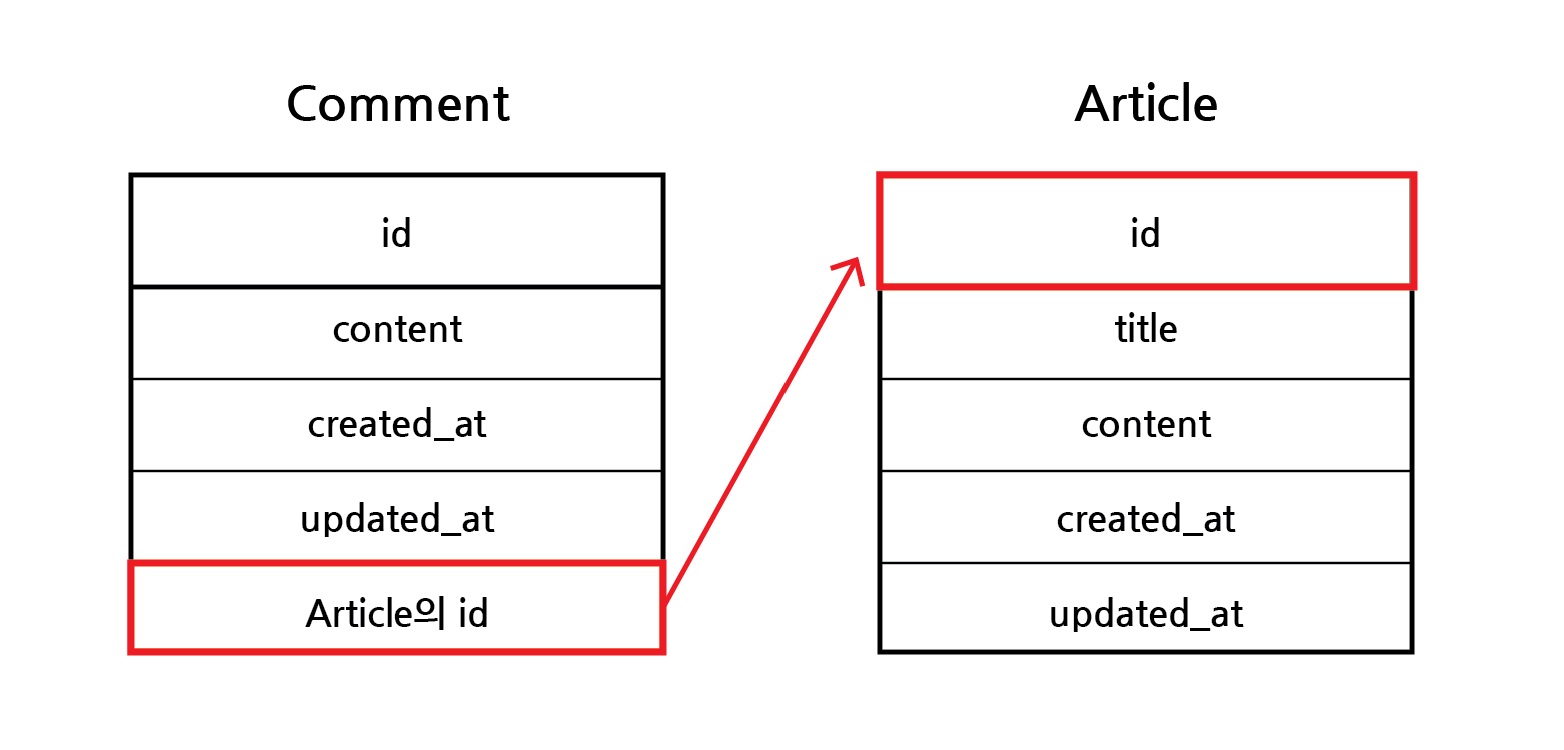
댓글과 기사의 관계
2-2. ForeignKey()
- Django에서 N:1 관계 설정 모델 필드
- ForeignKey(to, on_delete)
to: 참조하는 모델 클래스의 이름on_delete: 참조하는 모델 클래스가 삭제될 때, 연결된 하위 객체의 동작을 설정 (데이터 무결성)
- Comment 모델 정의
# articles/models.py

class Comment(models.Model):
    article = models.ForeignKey(Article, on_delete=models.CASCADE)
    content = models.CharField(max_length=200)
    created_at = models.DateTimeField(auto_now_add=True)
updated_at = models.DateTimeField(auto_now=True)- ForeignKey() 클래스의 인스턴스 이름은 참조하는 모델 클래스 이름의
단수형(소문자)로 작성하는 것을 권장함 - ForeignKey 클래스를 작성하는 위치와 상관없이
필드의 마지막에 생성됨 on_delete=models.CASCADE는 부모 클래스인 기사 객체 삭제 시, 이를 참조하는 댓글 객체도같이삭제함을 의미
2-3. 역참조
- 나(Article)를 참조하는 테이블(Comment : 나를 외래 키로 지정한)을 참조하는 것
- N:1에서 1이 N을 참조하는 상황
- Article에서는 Comment를 참조할 수 있는 어떠한 필드도 없음
- article.comment_set.all()
article: 모델 인스턴스 (1)comment_set: related manager (N)all(): QuerySet API
- related manager
- N:1 또는 M:N 관계에서
역참조시 사용하는manager objects라는 manager를 통해 QuerySet API를 사용한 것과 동일하게 related manager를 통해 QuerySet API를 사용할 수 있게 됨
- related manager가 필요한 이유
- article.comment 형식으로는 댓글 객체를 참조할 수 없음
- 실제 Article 클래스에는 Comment와 아무 관계가 작성되어있지 않기 때문
- 대신에 Django가 역참조를 할 수 있는
comment_set의 manager를 자동으로 생성주는 덕분에article.comment_set의 형태로 기사 객체에서 댓글 객체로 역참조가 가능함 - N:1 관계에서 생성되는 related manager의 이름은 참조하는
모델명_set의 규칙으로 만들어짐
- related manager 사용 예시
comments = article.comment_set.all()

for comment in comments:
    print(comment.content)
2-4. 댓글 생성 기능 구현
- view 함수 수정
# articles/views.py

from .forms import ArticleForm, CommentForm


def detail(request, pk):
    article = Article.objects.get(pk=pk)
    comment_form = CommentForm()
    context = {
        'article': article,
        'comment_form': comment_form,
    }
return render(request, 'articles/detail.html', context)- CommentForm을 view 함수로 전달
- detail 페이지에서 form 출력
<!--articles/detail.html-->

<form action="#" method="POST">
  {% csrf_token %}
  {{ comment_form }}
  <input type="submit">
</form>- detail 페이지에서 CommentForm 출력하기

CommentForm 출력 모습
- 이렇게 Article을 입력받도록 출력되는 이유는 Comment 클래스의 외래키 필드 article에서 어떤 article에 댓글을 작성할지에 대한 정보가 필요하기 때문에 출력되고 있음
- 하지만, 외래키 필드는
사용자의 입력을 통해서 입력받는 것이 아닌 view 함수에서 별도로 처리되어 저장되어야 함
- CommentForm에서 출력되는 필드 수정
# articles/forms.py

from .models import Article, Comment


class CommentForm(forms.ModelForm):
    class Meta:
        model = Comment
fields = ('content',)- content 필드만 입력 받도록 form 수정
- 출력에서 제외된 외래키 데이터는 어떻게 받아야 하는가?
- detail 페이지의 url을 보면
path('<int:pk>/', views.detail, name='detail')로서 url에 해당 게시글의 pk 값을 이미 사용하고 있음 - 외래키 데이터가 필요한 정보가 pk 값임
- 댓글 생성 url 설정
# articles/urls.py

urlpatterns = [
    ...,
    path('<int:pk>/comments/', views.comments_create, name='comments_create'),
]
- 댓글 생성 view 함수 작성
# articles/views.py

def comments_create(request, pk):
    article = Article.objects.get(pk=pk)
    comment_form = CommentForm(request.POST)
    if comment_form.is_valid():
        # article 객체는 언제 어떻게 저장해야할까?
        comment = comment_form.save(commit=False)
        comment.article = article
        comment_form.save()
        return redirect('articles:detail', article.pk)
    context = {
        'article': article,
        'comment_form': comment_form,
    }
    return render(request, 'articles/detail.html', context)
- save(commit=False)
- 데이터 베이스에
저장하지 않고 인스턴스만 반환하도록 save() 메서드 속성에 commit=False 명시 comment = comment_form.save(commit=False): comment_form을 저장하지 않고 일단 comment 변수에 인스턴스 반환comment.article = article: comment의 외래키(article)에 article 넣기
- detail 페이지 수정
<!--articles/detail.html-->

<form action="{% url 'articles:comments_create' article.pk %}" method="POST">
  {% csrf_token %}
  {{ comment_form }}
  <input type="submit">
</form>
2-5. 댓글 조회 구현
- 전체 댓글 출력하도록 view 함수 설정
# articles/views.py

from .models import Article, Comment


def detail(request, pk):
    article = Article.objects.get(pk=pk)
    comment_form = CommentForm()
    comments = article.comment_set.all()
    context = {
        'article': article,
        'comment_form': comment_form,
        'comments': comments,
    }
    return render(request, 'articles/detail.html', context)
- 전체 댓글 템플릿에서 출력
<!--articles/detail.html-->

<h4>댓글 목록</h4>
<ul>
  {% for comment in comments %}
  <li>{{ comment.content }}</li>
  {% endfor %}
</ul>
2-6. 댓글 삭제 구현
- 댓글 삭제 url 설정
# articles/urls.py

app_name = 'articles'
urlpatterns = [
    ...,
    path('<int:article_pk>/comments/<int:comment_pk>/delete/', views.comments_delete, name='comments_delete'),
]
- 댓글 삭제 view 함수 작성
# articles/views.py

def comments_delete(request, article_pk, comment_pk):
    comment = Comment.objects.get(pk=comment_pk)
    comment.delete()
    return redirect('articles:detail', article_pk)
- 댓글 삭제 버튼 생성
<!--articles/detail.html-->

<ul>
  {% for comment in comments %}
  <li>
    {{ comment.content }}
    <form action="{% url 'acticles:comments_delete' article.pk comment.pk %}" method="POST">
      {% csrf_token %}
      <input type="submit" value="DELETE">
    </form>
  </li>
  {% endfor %}
</ul>
3. 참고
3-1. 댓글 개수 출력
- DTL filter - length 사용
{{ comments|length }}

{{ article.comment_set.all|length }}
- QuerySet API - count() 사용
{{ article.comment_set.count }}3-2. 댓글 없는 경우 대체 컨텐츠 출력
- DTL tag - for empty 사용
<!--articles/detail.html-->

{% for comment in comments %}
<li>
  {{comment.content}}
  <form action="{% url 'articles:comments_delete' article.pk comment.pk %}" method="POST">
    {% csrf_token %}
    <input type="submit" value="DELETE">
  </form>
</li>
{% empty %}
<p>댓글이 없어요</p>
{% endfor %}
3-3. 댓글 수정
- 댓글 수정의 경우, 수정 페이지가 따로 있는 것이 아니며, 현재 페이지가 유지된 상태에서 Form 부분만 변경되어 수정
- 따라서 JavaScript를 사용하여 생성하는 것을 추천
3-4. Comment 모델 admin site 등록
# articles/admin.py

from .models import Article, Comment

admin.site.register(Article)
admin.site.register(Comment)


조정곤
주니어 프론트엔드 개발자


