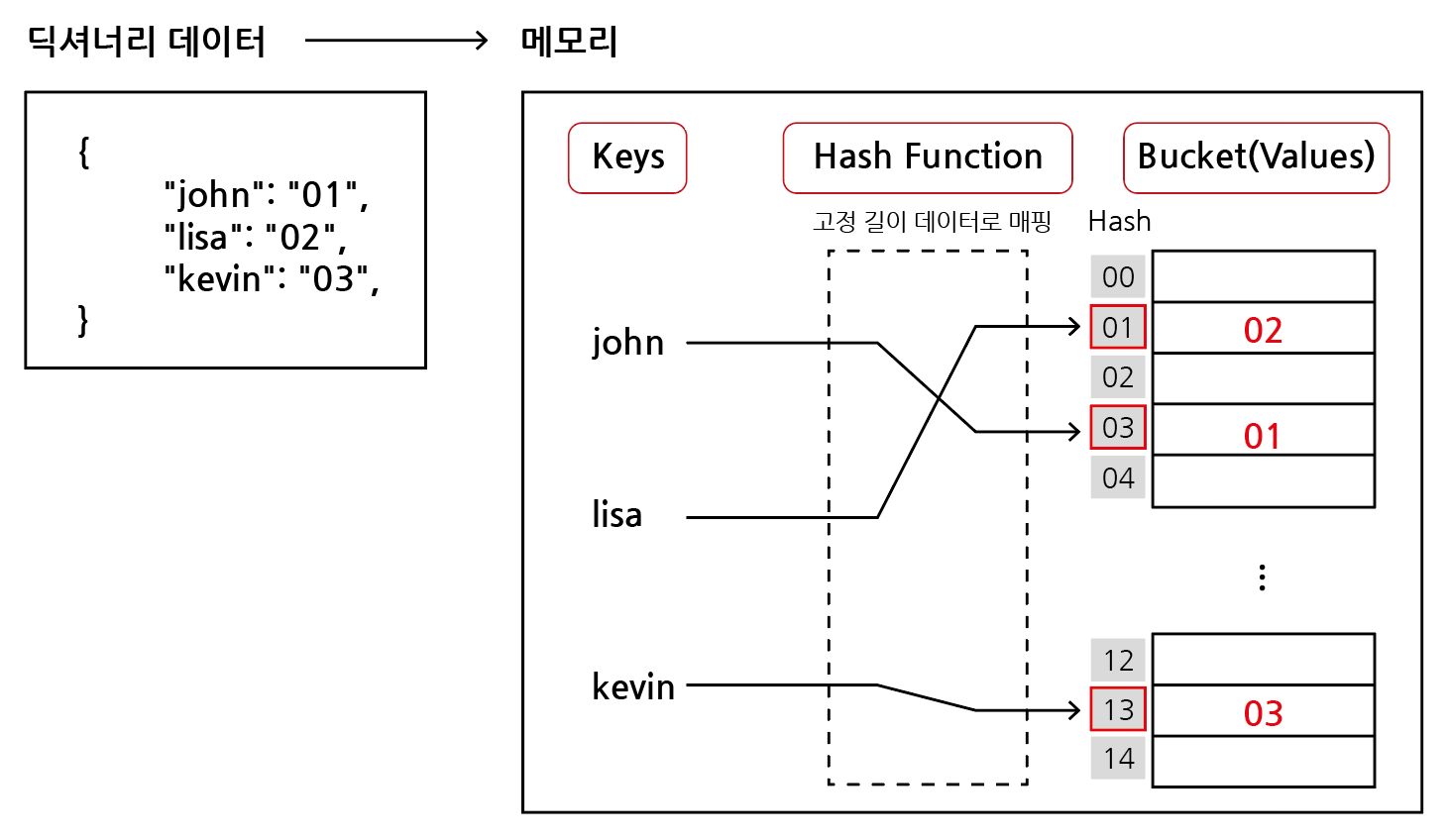
# ex) 딕셔너리 삽입
a ={"name":"james","gender":"male","address":"Seoul",}
a["job"]="programmer"# 해당 key가 없기에 삽입print(a)# 출력# {'name': 'james', 'gender': 'male', 'address': 'Seoul', 'job': 'programmer'}-------------------------------------------------------# ex) 딕셔너리 수정
a ={"name":"james","gender":"male","address":"Seoul",}
a["name"]="sam"# 딕셔너리에 해당 key가 있기에 수정print(a)# 출력# {'name': 'sam', 'gender': 'male', 'address': 'Seoul'}
3-3. 삭제1
딕셔너리.pop(key)
내부에 존재하는 key에 대한 value 삭제 및 반환, 존재하지 않는 key에 대해서는 KeyError 발생
# ex) 정상적인 삭제
a ={"name":"james","gender":"male","address":"Seoul",}
gender = a.pop("gender")print(a)print(gender)# 출력# {'name': 'james', 'address': 'Seoul'}# 'male'------------------------------------------------# ex) 삭제 시, 키 에러 발생
a ={"name":"james","gender":"male","address":"Seoul",}
phone = a.pop("phone")print(a)print(phone)# 출력# KeyError....
3-4. 삭제2
딕셔너리.pop(key, default)
두 번째 인자로 default(기본값)을 지정하여 KeyError 방지 가능
# ex)
a ={"name":"james","gender":"male","address":"Seoul",}
phone = a.pop("phone","010-1234-5678")# 두 번째 인자로 기본값 지정print(a)print(phone)# 출력# {'name': 'james', 'gender': 'male', 'address': 'Seoul'}# '010-1234-5678'
3-5. 조회
딕셔너리[key]
딕셔너리.get(key)
key에 해당하는 value 반환
없는 키를 조회할 경우, KeyError가 발생할 수 있다.
.get() 에서 두 번째 인자로 기본값을 지정하여 KeyError를 방지 할 수 있다.
# ex) 대괄호 사용 조회
a ={"name":"james","gender":"male","address":"Seoul",}print(a["name"])# 출력# 'james'--------------------------------------# ex) .get() 사용 조회
a ={"name":"james","gender":"male","address":"Seoul",}print(a.get("name"))# 출력# 'james'--------------------------------------# ex) 없는 키를 조회할 경우 KeyError
a ={"name":"james","gender":"male","address":"Seoul",}print(a["phone"])# 출력# KeyError...--------------------------------------# ex) .get()에 두 번째 인자로 기본값 지정
a ={"name":"james","gender":"male","address":"Seoul",}print(a.get("phone","없음"))# 출력# '없음'
4. 딕셔너리 메서드
4-1. keys()
딕셔너리 key 목록이 담긴 dict_keys 객체 반환
# ex)
a ={"name":"james","gender":"male","address":"Seoul",}print(a.keys())# 출력# dict_keys(['name', 'gender', 'address'])-------------------------------------------------------# ex)
a ={"name":"james","gender":"male","address":"Seoul",}for key in a.keys():print(key)# 출력# 'name'# 'gender'# 'address'-------------------------------------------------------# ex)
a ={"name":"james","gender":"male","address":"Seoul",}for key in a:print(key)# 출력# 'name'# 'gender'# 'address'
4-2. values()
딕셔너리 value 목록이 담긴 dict_values 객체 반환
# ex)
a ={"name":"james","gender":"male","address":"Seoul",}print(a.values())# 출력# dict_values(['james', 'male', 'Seoul'])------------------------------------------------------# ex)
a ={"name":"james","gender":"male","address":"Seoul",}for value in a.values():print(value)# 출력# 'james'# 'male'# 'Seoul'
4-3. items()
딕셔너리의 (key, value) 쌍 목록이 담긴 dict_items 객체 반환
# ex)
a ={"name":"james","gender":"male","address":"Seoul",}print(a.items())# 출력# dict_items([('name', 'james'), ('gender', 'male'), ('address', 'Seoul')])-------------------------------------------------------# ex)
a ={"name":"james","gender":"male","address":"Seoul",}for item in a.items():print(item)# 출력# ('name', 'james')# ('gender', 'male')# ('address', 'Seoul')-------------------------------------------------------# ex)
a ={"name":"james","gender":"male","address":"Seoul",}for key, value in a.items():print(key, value)# 출력# 'name' 'james'# 'gender' ' male'# 'address' 'Seoul'