# ex)# .replace(old, new[,count])# 바꿀 대상 글자를 새로운 글자로 바꿔서 반환# count를 지정하면, 해당 개수만큼만 시행print('coone'.replace('o','a'))# 출력# 'caane'print('wooooowoo'.replace('o','!',2))# 출력# 'w!!ooowoo'------------------------------------------------------------------------# .strip([chars])# 특정한 문자들을 지정하면# 양쪽을 제거하거나(strip), 왼쪽을 제거하거나(lstrip), 오른쪽을 제거(rstrip)# 문자열을 지정하지 않으면, 공백을 제거함print(' 와우!\n'.strip())# 출력# '와우!'print(' 와우!\n'.lstrip())# 출력# '와우!\n'print(' 와우!\n'.rstrip())# 출력# ' 와우!'print('안녕하세요!!!'.strip('!'))# 출력# '안녕하세요'------------------------------------------------------------------------# .split(seq=None, maxsplit=-1)# 문자열을 특정한 단위로 나눠 리스트로 반환# sep이 None이거나 지정되지 않으면 연속된 공백문자를 단일한 공백문자로 간주하고,# 선행/후행 공백은 빈문자열에 포함시키지 않음# maxsplit()이 -1인 경우에는 제한 없음print('a,b,c'.split('_'))# 출력# ['a, b, c']print('a b c'.split())# 출력# ['a', 'b', 'c']------------------------------------------------------------------------# 'separator'.join([iterable])# 반복가능한(iterable) 컨테이너 요소들을 separator(구분자)로 합쳐 문자열 반환# iterable에 문자열이 아닌 값이 있으면 TypeError 발생print(''.join['3','5'])# 출력# 35------------------------------------------------------------------------# 기타 변경
s ='hI! Everyone.'print(s)print(s.capitalize())print(s.title())print(s.upper())print(s.lower)print(s.swapcase())# 출력# 'hI! Everyone.'# 'Hi! everyone.'# 'Hi! Everyone'# 'HI! EVERYONE.'# 'hi! everyone.'# 'Hi! eVERYONE.'
3. 리스트(List) 메서드
3-1. 리스트 값 추가 및 삭제
문법
설명
L.append(x)
리스트 마지막에 항목 x를 추가
L.insert(i, x)
리스트 인덱스 i에 항목 x를 삽입
L.remove(x)
리스트 가장 왼쪽에 있는 항목(= 첫번째) x를 제거 항목이 존재하지 않을 경우, ValueError
L.pop()
리스트 가장 오른쪽에 있는 항목(= 마지막)을 반환 후 해당 항목을 리스트에서 제거
L.pop(i)
리스트의 인덱스 i에 있는 항목을 반환 후 해당 항목을 리스트에서 제거
L.extend(m)
순회형 m의 모든 항목들의 리스트 끝에 추가(+=과 같은 기능)
L.index(x, start, end)
리스트에 있는 항목 중 가장 왼쪽에 있는 항목 x의 인덱스를 반환
L.reverse()
리스트를 역순으로 뒤집음
L.sort()
리스트를 정렬(매개변수 이용가능)
L.count()
리스트에서 항목 x가 몇 개 존재하는지 개수를 반환
L.clear()
리스트의 모든 항목 제거
# ex)# L.append(x)
cafe =['starbucks','tomntoms','hollys']
cafe.append('banapresso')print(cafe)# 출력# ['starbucks', 'tomntoms', 'hollys', 'banapresso']------------------------------------------------------------------------# L.extend(iterable)
cafe =['starbucks','tomntoms','hollys']
cafe.extend(['cafe','test'])print(cafe)# 출력# ['starbucks', 'tomntoms', 'hollys', 'cafe', 'test']------------------------------------------------------------------------# L.insert(i, x)
cafe =['starbucks','tomntoms']
cafe.insert(0,'start')print(cafe)# 출력# ['start', 'starbucks', 'tomntoms']# i가 리스트의 길이 보다 큰 경우
cafe =['starbucks','tomntoms']
cafe.insert(10000,'end')print(cafe)# 출력# ['starbucks', 'tomntoms', 'end'] # 가장 뒤에 삽입된다.------------------------------------------------------------------------# L.remove(x)
numbers =[1,2,3,'hi']
numbers.remove('hi')print(numbers)# 출력# [1, 2, 3]# 없는 요소 제거시
numbers =[1,2,3]
numbers.remove(7)# 출력# ValueError: list.remove(x): x not in list # 값 에러 발생------------------------------------------------------------------------# L.pop()
numbers =['hi',1,2,3]
pop_number = numbers.pop()print(pop_number)print(numbers)# 출력# 3# ['hi', 1, 2]# L.pop(i)
numbers =['hi',1,2,3]
pop_number = numbers.pop(0)print(pop_number)print(numbers)# 출력# 'hi'# [1, 2, 3]------------------------------------------------------------------------# L.clear()
numbers =[1,2,3]
numbers.clear()print(numbers)# 출력# []------------------------------------------------------------------------# L.index(x)
numbers =[1,2,3,4]print(numbers.index(3))print(numbers.index(100))# 출력# 2# ValueError: 100 in not in list # 없는 요소의 인덱스 조회 시, 값 에러 발생------------------------------------------------------------------------# L.count(x)
numbers =[1,1,2,3,1]print(numbers.count(1))print(numbers.count(100))# 출력# 3# 0------------------------------------------------------------------------# L.sort()# 원본 리스트를 정렬함, None 반환
numbers =[3,2,5,1]
result = numbers.sort()print(numbers, result)# 출력# [1, 2, 3, 5] None# sorted() 함수와 비교
numbers =[3,2,5,1]
result =sorted(numbers)print(numbers, result)# 출력# [3, 2, 5, 1] [1, 2, 3, 5]------------------------------------------------------------------------# L.reverse()# 순서를 반대로 뒤집음(정렬하는 것 아님), None 반환
numbers =[3,2,5,1]
result = numbers.reverse()print(numbers, result)# 출력# [1, 5, 2, 3] None
4. 세트(Set) 메서드
문법
설명
s.copy()
세트의 얕은 복사본을 반환
s.add(x)
항목 x가 세트 s에 없다면 추가
s.pop()
세트 s에서 랜덤하게 항목을 반환하고, 해당 항목을 제거 세트가 비어 있을 경우, KeyError
s.remove(x)
항목 x를 세트 s에서 삭제 항목이 존재하지 않을 경우, KeyError
s.discard(x)
항목 x가 세트 s에 있는 경우, 항목 x를 세트 s에서 삭제
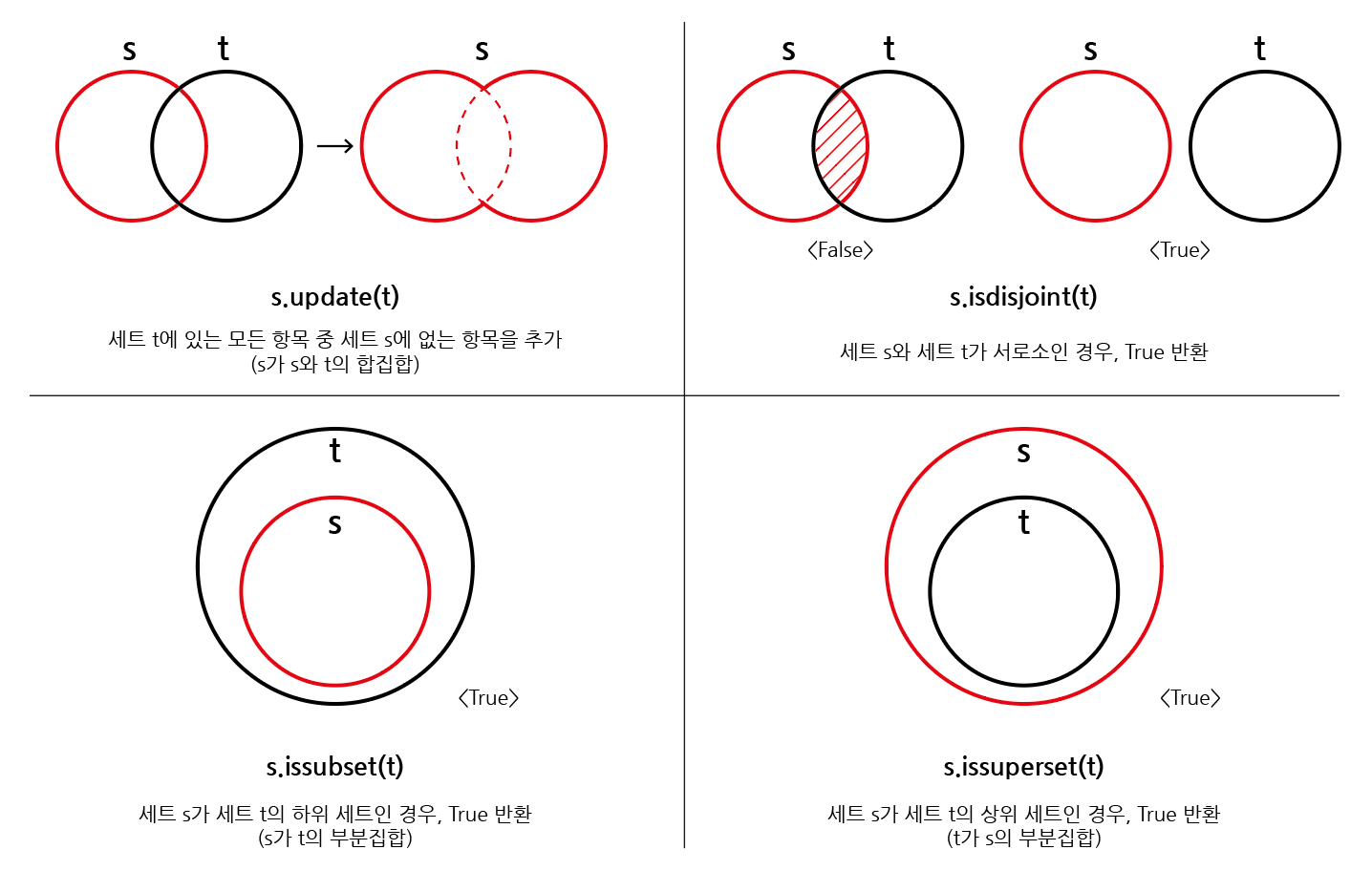
s.update(t)
세트 t에 있는 모든 항목 중 세트 s에 없는 항목을 추가
s.clear()
세트의 모든 항목을 제거
s.isdisjoint(t)
세트 s가 세트 t의 서로 같은 항목을 하나라도 갖고 있지 않은 경우, True 반환
s.issubset(t)
세트 s가 세트 t의 하위 세트인 경우, True 반환
s.issuperset(t)
세트 s가 세트 t의 상위 세트인 경우, True 반환
# ex)# s.copy() : 세트의 얕은 복사본을 반환
original_set ={1,2,3}
copied_set = original_set.copy()print(copied_set)# 출력# {1, 2, 3}-----------------------------------------------------# s.add(x) : 항목 x가 세트 s에 없다면 추가
my_set ={1,2,3}
my_set.add(4)print(my_set)# 출력# {1, 2, 3, 4}-----------------------------------------------------# s.pop() : 세트 s에서 랜덤하게 항목을 반환하고, 해당 항목을 제거
my_set ={1,2,3,4}
popped_item = my_set.pop()print(popped_item)print(my_set)# 출력# (랜덤한 값)# 나머지 세트-----------------------------------------------------# s.remove(x) : 항목 x를 세트 s에서 삭제
my_set ={1,2,3,4}
my_set.remove(3)print(my_set)# 출력# {1, 2, 4}-----------------------------------------------------# s.discard(x) : 항목 x가 세트 s에 있는 경우, 항목 x를 세트 s에서 삭제
my_set ={1,2,3,4}
my_set.discard(3)print(my_set)# 출력# {1, 2, 4}-----------------------------------------------------# s.update(t) : 세트 t에 있는 모든 항목 중 세트 s에 없는 항목을 추가
set1 ={1,2,3}
set2 ={3,4,5}
set1.update(set2)print(set1)# 출력# {1, 2, 3, 4, 5}-----------------------------------------------------# s.clear() : 세트의 모든 항목을 제거
my_set ={1,2,3,4}
my_set.clear()print(my_set)# 출력# set()-----------------------------------------------------# s.isdisjoint(t) : 세트 s가 세트 t의 서로 같은 항목을 하나라도 갖고 있지 않은 경우, True 반환
set1 ={1,2,3}
set2 ={4,5,6}
is_disjoint = set1.isdisjoint(set2)print(is_disjoint)# 출력# True-----------------------------------------------------# s.issubset(t) : 세트 s가 세트 t의 하위 세트인 경우, True 반환
set1 ={1,2}
set2 ={1,2,3,4}
is_subset = set1.issubset(set2)print(is_subset)# 출력# True-----------------------------------------------------# s.issuperset(t) : 세트 s가 세트 t의 상위 세트인 경우, True 반환
set1 ={1,2,3,4}
set2 ={1,2}
is_superset = set1.issuperset(set2)print(is_superset)# 출력# True
세트 메서드 다이어그램
5. 딕셔너리(Dictionary) 메서드
문법
설명
d.clear()
딕셔너리의 모든 항목 제거
d.keys()
딕셔너리 d의 모든 키를 담은 뷰를 반환
d.values()
딕셔너리 d의 모든 값을 담은 뷰를 반환
d.items()
딕셔너리 d의 모든 키-값 쌍을 담은 뷰를 반환
d.get(k)
키 k의 값을 반환하는데 키 k가 딕셔너리 d에 없을 경우, None을 반환
d.get(k, v)
키 k의 값을 반환하는데 키 k가 딕셔너리 d에 없을 경우, v를 반환
d.pop(k)
키 k의 값을 반환하고 키 k인 항목을 딕셔너리 d에서 삭제하는데, 키 k가 딕셔너리 d에 없을 경우, KeyError를 발생
d.pop(k, v)
키 k의 값을 반환하고 키 k인 항목을 딕셔너리 d에서 삭제하는데, 키 k가 딕셔너리 d에 없을 경우, v를 반환
d.update([other])
딕셔너리 d의 값을 매핑하여 업데이트
# ex)# d.get(key[,default])dict={'apple':'사과','banana':'바나나'}dict['pineapple']# 출력# KeyError: 'pineapple'# 기본값 지정dict={'apple':'사과','banana':'바나나'}print(dict.get('pineapple'))print(dict.get('apple'))print(dict.get('pineapple',0))# 출력# None# '사과'# 0----------------------------------------------------# d.pop(key[,default])dict={'apple':'사과','banana':'바나나'}
data =dict.pop('apple')print(data,dict)# 출력# '사과' {'banana': '바나나'}# 없는 키를 pop()할 경우dict={'apple':'사과','banana':'바나나'}
data =dict.pop('pineapple')print(data,dict)# 출력# KeyError: 'pineapple' # 키 에러 발생----------------------------------------------------# d.update([other])# 값을 제공하는 key, value로 덮어쓴다.dict={'apple':'사과','banana':'바나나'}dict.update(apple='포도')print(dict)# 출력# {'apple': '포도', 'banana': '바나나'}
6. 매직 메서드
‘매직 메서드’는 특정한 이름을 가진 메서드로, 객체의 특정 상황에서 자동으로 호출되는 메서드를 말한다.
이러한 메서드들은 언더바('__')로 시작하고 끝나는데, 파이썬에서는 이러한 메서드들을 이용하여 객체의 행동을
커스터마이징하거나 특정 연산을 지원하도록 할 수 있다.
문법
설명
__init__(self, …)
객체가 생성될 때, 호출되는 메서드로, 초기화 작업을 수행한다.
__str__(self)
str() 함수가 호출될 때 객체를 문자열로 변환하는 메서드로 주로 print() 함수에 사용된다.
__len__(self)
len() 함수가 호출될 때, 객체의 길이를 반환하는 메서드이다.
__getitem__(self, key)
인덱스로 객체에 접근할 때, 호출되는 메서드이다.
__setitem__(self, key, value)
인덱스에 값을 할당할 때, 호출되는 메서드이다.
__delitem__(self, key)
인덱스로 객체의 요소를 삭제할 때, 호출되는 메서드이다.
__call__(self, …)
객체를 함수처럼 호출할 때, 호출되는 메서드이다.
__eq__(self, other)
두 객체가 동등한지 비교하는 메서드로, ’==’ 연산자에 사용된다.
__lt__(self, other)
“less than”의 약어로, 작다(<)를 나타낸다. 따라서 ’<’ 연산자 호출시 사용되는 메서드이다.
__le__(self, other)
“less than or equal”의 약어로, 작거나 같다(<=)를 나타낸다. 따라서 ’<=’ 연산자 호출시 사용되는 메서드이다.
__gt__(self, other)
“greater than”의 약어로, 크다(>)를 나타낸다. 따라서 ’>’ 연산자 호출시 사용되는 메서드이다.
__ge__(self, other)
“greater than or equal”의 약어로, 크거나 같다(>=)를 나타낸다. 따라서 ’>=’ 연산자 호출시 사용되는 메서드이다.
# ex)# __init__ : 객체 생성classMyClass:def__init__(self, name):
self.name = name
obj = MyClass("Example")--------------------------------------------------------# __str__ : 객체를 문자열로 변환classMyClass:def__init__(self, name):
self.name = name
def__str__(self):returnf"MyClass instance with name: {self.name}"
obj = MyClass("Example")print(str(obj))# 출력# "MyClass instance with name: Example"--------------------------------------------------------# __len__ : 객체의 길이 확인classMyList:def__init__(self, items):
self.items = items
def__len__(self):returnlen(self.items)
my_list = MyList([1,2,3,4,5])print(len(my_list))# 출력# 5--------------------------------------------------------# __getitem__ 및 __setitem__ : 인덱스로 객체에 접근 및 할당classMyList:def__init__(self, items):
self.items = items
def__getitem__(self, index):return self.items[index]def__setitem__(self, index, value):
self.items[index]= value
my_list = MyList([1,2,3,4,5])print(my_list[2])
my_list[2]=10print(my_list[2])# 출력# 3# 10--------------------------------------------------------# __call__ : 객체를 함수처럼 호출classCallableClass:def__call__(self, x, y):return x + y
obj = CallableClass()
result = obj(3,5)print(result)# 출력# 8--------------------------------------------------------# __eq__ : 두 객체의 동등성 비교classPoint:def__init__(self, x, y):
self.x = x
self.y = y
def__eq__(self, other):return self.x == other.x and self.y == other.y
point1 = Point(1,2)
point2 = Point(1,2)print(point1 == point2)# 출력# True--------------------------------------------------------# __lt__ : 작은지 비교classPoint:def__init__(self, x, y):
self.x = x
self.y = y
def__lt__(self, other):return self.x < other.x and self.y < other.y
point1 = Point(1,2)
point2 = Point(3,4)print(point1 < point2)# 출력# True--------------------------------------------------------# __le__ : 작거나 같은지 비교classPoint:def__init__(self, x, y):
self.x = x
self.y = y
def__le__(self, other):return self.x <= other.x and self.y <= other.y
point1 = Point(1,2)
point2 = Point(3,4)print(point1 <= point2)# 출력# True--------------------------------------------------------# __gt__ : 큰 지 비교classPoint:def__init__(self, x, y):
self.x = x
self.y = y
def__gt__(self, other):return self.x > other.x and self.y > other.y
point1 = Point(3,4)
point2 = Point(1,2)print(point1 > point2)# 출력# True--------------------------------------------------------# __ge__ : 크거나 같은지 비교classPoint:def__init__(self, x, y):
self.x = x
self.y = y
def__ge__(self, other):return self.x >= other.x and self.y >= other.y
point1 = Point(3,4)
point2 = Point(1,2)print(point1 >= point2)# 출력# True