


목 차![down-arrow]()


〈
GraphQL Mutation - CRUD
2024.03.19.


Mutation - CRUD
1. CRUD
- REST를 이용해 Create(생성), Read(조회), Update(수정), Delete(삭제)가 가능함
- GraphQL은 Mutation을 통해 가능함
2. Mutation
- 변화, 돌연변이를 의미함
- GraphQL에서 CRUD 작업 시, Query가 아닌 Mutation으로 처리하기
2-1. Mutation 사용 방법
- 쿼리 요청시 mutation 사용
# 기존 데이터 조회 요청

query {
    post(id: "post1") {
        id
        title
        description
    }
}
# mutation 사용한 쿼리 요청
mutation {
addNewPost(
# 이러한 데이터를 가진 포스트 생성
id: "post3",
title: "It is a third post"
description: "It is a third post description"
) {
# 생성한 후에 응답(return)으로 오는 데이터
title
description
}
}2-2. posts에 데이터 추가
- 새로운 포스트 생성해보기
- 스키마에 Mutation 정의
#posts/posts.graphql

type Query {
    posts: [Post]
    post(id: ID!): Post
}

# Mutation 스키마 추가
type Mutation {
    addNewPost(id: ID!, title: String!, description: String!): Post
}

type Post {
    id: ID!
    title: String!
    description: String!
    comments: [Comment]
}
- resolver 함수 생성
// posts/posts.resolvers.js

const postsModel = require("./posts.model");

module.exports = {
  Query: {
    posts: () => {
      return postsModel.getAllPosts();
    },
    post: (_, args) => {
      return postsModel.getPostById(args.id);
    },
  },
  Mutation: {
    // 해당 args 객체로 오는 값들이 (id, title, description)임
    addNewPost: (_, args) => {
      // 로직은 model 파일에 따로 작성
    },
  },
};
- model에서 데이터 추가 로직 작성
// posts/posts.model.js

// ...

// 데이터 추가하는 로직 작성
function addNewPost(id, title, description) {
  // newPost 객체 생성
  const newPost = {
    id,
    title,
    description,
    comments: [],
  };
  // posts 배열에 데이터 넣어주기
  posts.push(newPost);
  // 추가한 newPost 반환
  return newPost;
}

module.exports = {
  getAllPosts,
  getPostById,

  // 작성한 로직 내보내기
  addNewPost,
};
- resolver 함수에 로직 가져오기
// posts/posts.resolvers.js

const postsModel = require("./posts.model");

module.exports = {
  Query: {
    posts: () => {
      return postsModel.getAllPosts();
    },
    post: (_, args) => {
      return postsModel.getPostById(args.id);
    },
  },
  Mutation: {
    addNewPost: (_, args) => {
      // 로직 가져오기
      return postsModel.addNewPost(args.id, args.title, args.description);
    },
  },
};
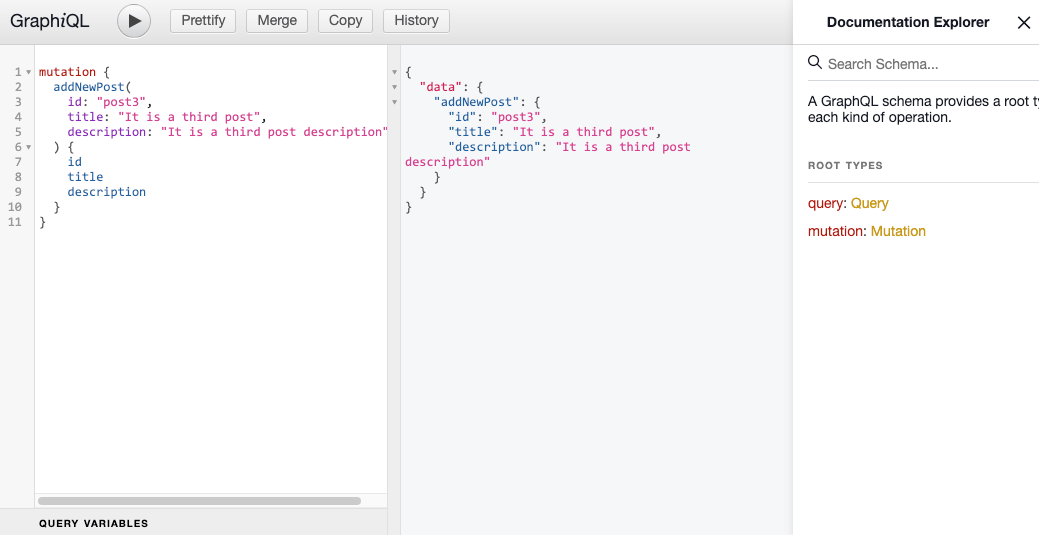
Mutation을 통해 데이터 추가 테스트


조정곤
주니어 프론트엔드 개발자


