logo

JEONGGON

    블로그
github
mode
목 차
down-arrow

GraphQL 필터링

2024.03.19.

post-thumbnail

필터링

1. comments 필터링 기능 추가하기

  • comments 데이터에서 likes특정 숫자 이상인 comments만 가져올 수 있도록 하기
#comments/comments.graphql 기존 파일

type Query {
    comments: [Comment]
}

type Comment {
    id: ID!
    text: String!
    likes: Int
}

1-1. comments.graphql 파일에서 스키마 정의

  • commentsByLikes(minLikes: Int!): [Comment]를 추가하기
#comments/comments.graphql

type Query {
    comments: [Comment]
    commentsByLikes(minLikes: Int!): [Comment]
}

#...

1-2. Resolver 만들기

  • resolver 함수의 인자 중 필터링을 위해 args가 필요함
  • args는 순서 상, 2번째 인자로 받기에 (\_, args)와 같이 parent는 언더바(’_‘)로 처리하고 args는 args로 받기
  • resolver 파일은 최대한 간단하게 작성하는 것이 좋기에 로직은 model 파일에서 작성
// comments/comments.resolvers.js

const commentsModel = require("./comments.model");

module.exports = {
  Query: {
    comments: () => {
      return commentsModel.getAllComments();
    },

    // 해당 resolver 추가
    commentsByLikes: (_, args) => {
      // 해당 로직은 model 모듈에서 분리해서 작성
    },
  },
};

1-3. model에서 로직 작성

  • model에서 minLikes를 받아 filter()로 comments에서 likes가 minLikes 이상인 comment들 리턴하는 로직 생성
// comments/comments.model.js

const comments = [
  {
    id: "comment1",
    text: "It is a first comment",
    likes: 1,
  },
  {
    id: "comment2",
    text: "It is a second comment",
    likes: 10,
  }
];

function getAllComments() {
  return comments;
}

// 해당 필터링 로직 생성
function getCommentsByLikes(minLikes) {
  return comments.filter((comment) => comment.likes >= minLikes);
}

module.exports = {
  getAllComments,

  // 내보내기
  getCommentsByLikes,
};

1-4. resolver 파일에 getCommentsByLikes 로직 가져오기

// comments/comments.resolvers.js

const commentsModel = require("./comments.model");

module.exports = {
  Query: {
    comments: () => {
      return commentsModel.getAllComments();
    },
    commentsByLikes: (_, args) => {
      // 로직 가져오기, 매개변수 args 객체에 담긴 minLikes 보내기
      return commentsModel.getCommentsByLikes(args.minLikes);
    },
  },
};

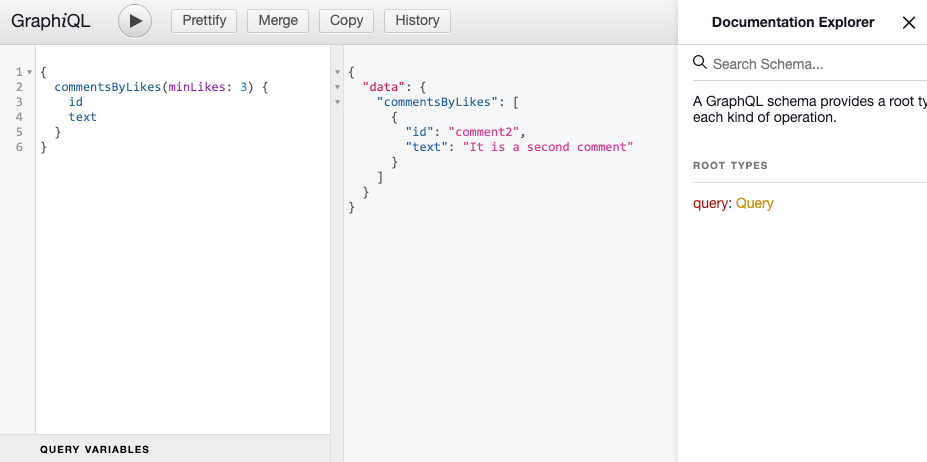
GraphQL_filtering
resolver 함수 및 args 인자를 통한 필터링 결과 예시


2. ID 이용해 데이터 가져오기

  • posts 데이터에서 postID를 이용해서 post 가져오기

2-1. posts.graphql 파일에서 스키마 정의

  • post(id: ID!): Post 쿼리를 스키마에 추가
  • 단일 데이터이므로 [Post]가 아닌 Post임
#posts/posts.graphql

type Query {
    posts: [Post]
    post(id: ID!): Post
}

type Post {
    id: ID!
    title: String!
    description: String!
    comments: [Comment]
}

2-2. 해당 쿼리에 대응하는 Resolver 함수 생성

// posts/posts.resolvers.js

const postsModel = require("./posts.model");

module.exports = {
  Query: {
    posts: () => {
      return postsModel.getAllPosts();
    },

    // 해당 resolver 추가
    post: (_, args) => {
      // 해당 로직은 model 모듈에서 분리해서 작성 
    },
  },
};

2-3. id에 맞는 post를 가져오는 로직 model에 작성

// posts/posts.model.js

const posts = [
  {
    id: "post1",
    title: "It is a first post",
    description: "It is a first post description",
    comments: [
      {
        id: "comment1",
        text: "It is a first comment",
        likes: 1,
      },
    ],
  },
  {
    id: "post2",
    title: "It is a second post",
    description: "It is a second post description",
    comments: [],
  },
];

function getAllPosts() {
  return posts;
}

// 로직 작성
function getPostById(id) {
  return posts.find((post) => post.id === id);
}

module.exports = {
  getAllPosts,

  // 로직 내보내기
  getPostById,
};

2-4. resolver 파일에 getPostById 로직 가져오기

// posts/posts.resolvers.js

const postsModel = require("./posts.model");

module.exports = {
  Query: {
    posts: () => {
      return postsModel.getAllPosts();
    },
    post: (_, args) => {
      // 로직 가져오기
      return postsModel.getPostById(args.id);
    },
  },
};

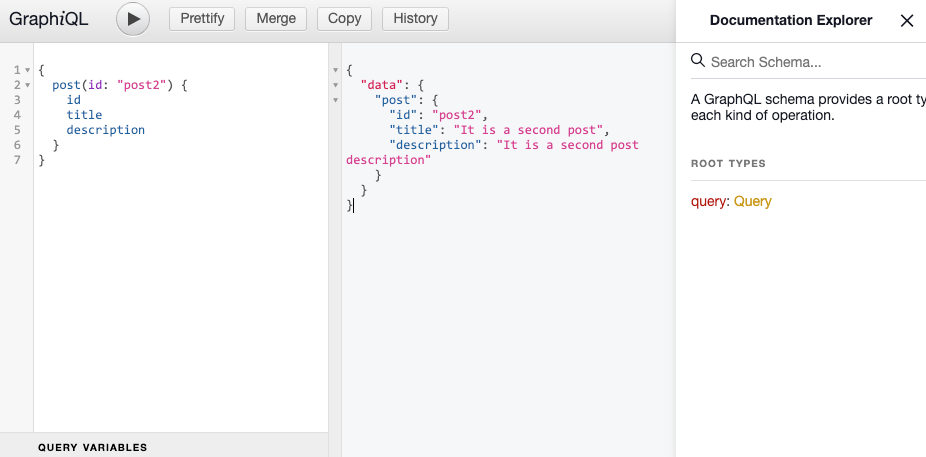
GraphQL_filtering_id
resolver 함수 및 args 인자를 통한 데이터 선별 결과 예시

graphqldataquerynosqlfilter
profile

조정곤

주니어 프론트엔드 개발자

github
linkedin
instagram
email

< 이전글

GraphQL Mutation - CRUD

다음글 >

Webpack import

Graphql 포스트 (8)

down-arrow
GraphQL Expressjs 서버GraphQL 소개GraphQL GraphiQLGraphQL SchemaGraphQL ResolverGraphQL graphql-toolsGraphQL Mutation - CRUDGraphQL 필터링