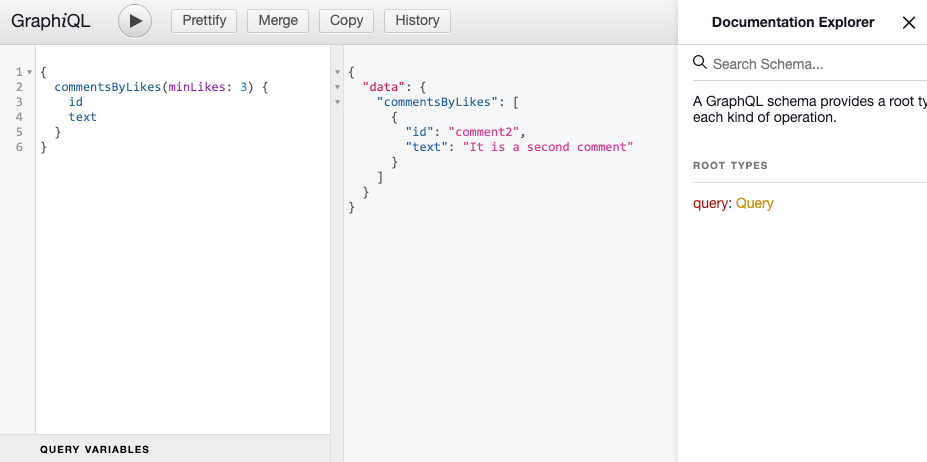
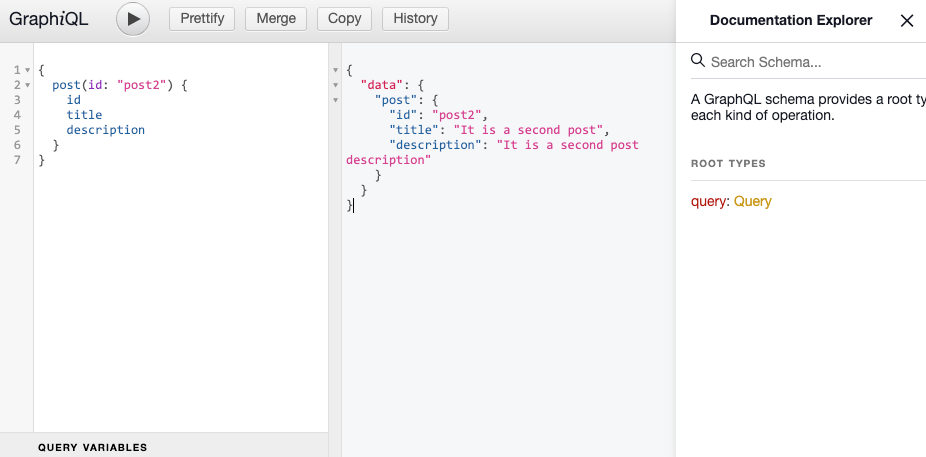
args는 순서 상, 2번째 인자로 받기에 (\_, args)와 같이 parent는 언더바(’_‘)로 처리하고 args는 args로 받기
resolver 파일은 최대한 간단하게 작성하는 것이 좋기에 로직은 model 파일에서 작성
// comments/comments.resolvers.jsconst commentsModel =require("./comments.model");
module.exports ={Query:{comments:()=>{return commentsModel.getAllComments();},// 해당 resolver 추가commentsByLikes:(_, args)=>{// 해당 로직은 model 모듈에서 분리해서 작성},},};
1-3. model에서 로직 작성
model에서 minLikes를 받아 filter()로 comments에서 likes가 minLikes 이상인 comment들 리턴하는 로직 생성
// comments/comments.model.jsconst comments =[{id:"comment1",text:"It is a first comment",likes:1,},{id:"comment2",text:"It is a second comment",likes:10,}];functiongetAllComments(){return comments;}// 해당 필터링 로직 생성functiongetCommentsByLikes(minLikes){return comments.filter((comment)=> comment.likes >= minLikes);}
module.exports ={
getAllComments,// 내보내기
getCommentsByLikes,};
// posts/posts.resolvers.jsconst postsModel =require("./posts.model");
module.exports ={Query:{posts:()=>{return postsModel.getAllPosts();},// 해당 resolver 추가post:(_, args)=>{// 해당 로직은 model 모듈에서 분리해서 작성 },},};
2-3. id에 맞는 post를 가져오는 로직 model에 작성
// posts/posts.model.jsconst posts =[{id:"post1",title:"It is a first post",description:"It is a first post description",comments:[{id:"comment1",text:"It is a first comment",likes:1,},],},{id:"post2",title:"It is a second post",description:"It is a second post description",comments:[],},];functiongetAllPosts(){return posts;}// 로직 작성functiongetPostById(id){return posts.find((post)=> post.id === id);}
module.exports ={
getAllPosts,// 로직 내보내기
getPostById,};