logo

JEONGGON

    블로그
github
mode
목 차
down-arrow

GraphQL Resolver

2024.03.18.

post-thumbnail

Resolver

1. Resolver란?

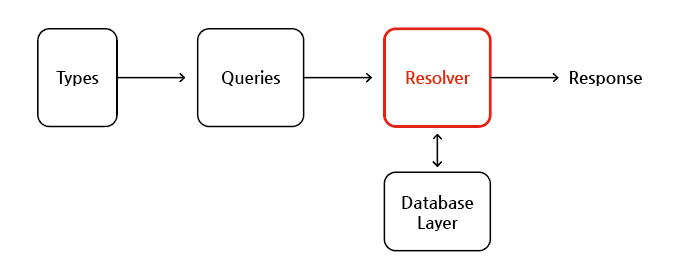
  • 스키마의 단일 필드에 대한 데이터를 채우는 역할을 하는 함수
  • 백엔드 DB 또는 타사의 API에서 데이터를 가져오는 것과 같이 원하는대로 정의한 방식으로 데이터를 채울 수 있음

GraphQL_Resolver
Resolver


  • 하드코딩 된 데이터를 전달하는 것이 아닌 특정 카테고리 혹은 특정 가격대의 물건을 전달하는 필터링 기능과 같은 처리를 해주는 부분을 Resolver에서 해주면 됨
  • 다이나믹하게 데이터를 컨트롤할 수 있음

1-1. Resolver 사용

- resolver 함수 생성

// server.js

// 스키마를 모아서 등록한 makeExecutableSchema에 resolvers 넣어주기
const schema = makeExecutableSchema({
  typeDefs: loadedTypes,

  // resolver
  resolvers: {
    Query: {
      posts: (parent, args, context, info) => {
        console.log('parent', parent);
        console.log('args', args);
        console.log('context', context);
        console.log('info', info);
        return parent.posts;
      },
      comments: (parent) => {
        return parent.comments;
      }
    }
  }
})
  • resolver 함수는 4개의 매개변수를 받을 수 있음
  • 주로 parent와 args 매개변수를 많이 이용함
  1. parent : 이 필드의 부모(즉, resolver 체인의 이전 resolver)에 대한 resolver의 반환 값
#parent 출력 예시

parent {
    posts: [
        {
            id: 'post1',
            title: 'It is a first post',
            description: 'It is a first post description',
            comments: [Array]
        },
        {
            id: 'post2',
            title: 'It is a second post',
            description: 'It is a second post description',
            comments: []
        }
    ],
    comments: [
        {
            id: 'comment1',
            text: 'It is a first comment',
            likes: 1
        }
    ]
}

  1. args : 이 필드에 제공된 모든 GraphQL 인수를 포함하는 객체로서 해당 값을 통해 필터링을 함
#graphql 쿼리

{
    posts (postID: 1) {
        ...
    }
}
  • 위와 같은 GraphQL 쿼리에서 전달한 인자가 포함됨
#args 출력 예시

args {}

  1. context : 특정 작업에 대해 실행 중인 모든 resolver 간에 공유되는 object로서 인증 정보, 데이터 로더 인스턴스 및 resolver에서 추적할 기타 항목을 포함하여 작업별 상태를 공유하는데 사용함
#context 출력 예시

context <ref *2> IncomingMessage {
    _readableState: ReadableState {
        objectMode: false,
        ...
    }
}
  • 주로 인증처리에 이용
// server.js

// context를 통한 인증처리 resolver 예시
const resolvers = {
  Query: {
    adminExample: (parent, args, context, info) => {
      if (context.authScope !== ADMIN) {
        throw new GraphQLError('not admin!', {
          extensions: { code: 'UNAUTHENTICATED' },
        });
      }
    },
  },
};

  1. info : 필드 이름, 루트에서 필드까지의 경로 등을 포함하여 작업의 실행 상태에 대한 정보를 포함함
#info 출력 예시

info {
    fieldName: 'posts',
    fieldNodes: [
        {
            kind: 'Field',
            alias: undefined,
            name: [Object],
            ...
        }
    ],
    returnType: [Post],
    parentType: Query,
    ...
}

- resolver 함수에서 비동기 처리

const resolvers = {
  Query: {
    posts: async (parent) => {
      const product = await Promise.resolve(parent.posts);
      return product;
    },
    comments: (parent) => {
      return parent.comments;
    }
  }
}

1-2. Resolver 모듈화 하기

- resolver 파일 생성

  • comments/comments.resolvers.js 파일 생성
  • posts/posts.resolvers.js 파일 생성

- resolver 소스코드 분리

// comments/comments.resolvers.js

module.exports = {
  Query: {
    comments: (parent) => {
      return parent.comments;
    }
  }
}
// posts/posts.resolvers.js

module.exports = {
  Query: {
    posts: async (parent) => {
      const product = await Promise.resolve(parent.comments);
      return product;
    }
  }
}

- server.js로 resolver 파일들 가져오기

  • 분리된 graphql 타입 파일들을 한 번에 모아주는 graphql-tools/load-files 모듈의 loadFilesSync()를 사용한 것과 같이 동일하게 분리한 resolver 파일들을 한 번에 가져오기 위해 loadFilesSync() 함수 사용
// server.js

const { loadFilesSync } = require("@graphql-tools/load-files");
const path = require("path");

// 절대 경로를 이용해 가져오기
const loadedResolvers = loadFilesSync(path.join(__dirname, "**/*.resolvers.js"));

const schema = makeExecutableSchema({
  typeDefs: loadedTypes,
  resolvers: loadedResolvers,
});

- 로직을 model 함수에서 만들어 처리하기

  • resolver 파일은 최대한 간단하게 만드는 것이 좋음
  • 따라서 resolver 함수 안의 로직을 model 모듈 파일에서 작성해서 처리하기
// posts/posts.model.js

const posts = [
  {
    id: "post1",
    title: "It is a first post",
    description: "It is a first post description",
    comments: [
      {
        id: "comment1",
        text: "It is a first comment",
        likes: 1,
      },
    ],
  },
  {
    id: "post2",
    title: "It is a second post",
    description: "It is a second post description",
    comments: [],
  },
];

// 모든 포스트들을 가져오는 함수(로직) 생성
function getAllPosts() {
  return posts;
}

// 함수 내보내기
module.exports = {
  getAllPosts,
};
// comments/comments.model.js

const comments = [
  {
    id: "comment1",
    text: "It is a first comment",
    likes: 1,
  },
];

function getAllComments() {
  return comments;
}

module.exports = {
  getAllComments,
};

- resolver 파일로 model 파일에 작성한 로직 가져오기

  • 원래는 resolver 함수에서 root 데이터인 parent를 인자로 받아서 사용했지만 model 파일 자체에서 로직에서 데이터를 처리하기에 parent 인자가 필요없어짐
// posts/posts.resolvers.js

// model 모듈 가져오기
const postsModel = require("./posts.model");

module.exports = {
  Query: {
    posts: () => {
      return postsModel.getAllPosts(); // resolver 로직 넣어주기
    },
  },
};
// comments/comments.resolvers.js

const commentsModel = require("./comments.model");

module.exports = {
  Query: {
    comments: () => {
      return commentsModel.getAllComments();
    },
  },
};

- server.js에서 root 삭제

  • root 자체가 필요없기에 server.js에서 삭제해도 됨
// server.js

const express = require("express");
const { graphqlHTTP } = require("express-graphql");
const { makeExecutableSchema } = require("@graphql-tools/schema");
const { loadFilesSync } = require("@graphql-tools/load-files");
const path = require("path");

const PORT = 4000;
const app = express();

const loadedTypes = loadFilesSync("**/*", {
  extensions: ["graphql"],
});

const loadedResolvers = loadFilesSync(path.join(__dirname, "**/*.resolvers.js"));

const schema = makeExecutableSchema({
  typeDefs: loadedTypes,
  resolvers: loadedResolvers,
});

// 필요 없음
// const root = {
//   posts: require("./posts/posts.model"),
//   comments: require("./comments/comments.model"),
// };

app.use(
  "/graphql",
  graphqlHTTP({
    schema: schema,
    // rootValue: root, 해당 부분도 필요 없어짐
    graphiql: true,
  })
);

app.listen(PORT, () => {
  console.log(`Running a GraphQL API server at http://localhost:${PORT}/graphql`);
});
graphqldataquerynosqlresolver
profile

조정곤

주니어 프론트엔드 개발자

github
linkedin
instagram
email

< 이전글

Webpack 폴더 및 파일 구조

다음글 >

GraphQL graphql-tools

Graphql 포스트 (8)

down-arrow
GraphQL Expressjs 서버GraphQL 소개GraphQL GraphiQLGraphQL SchemaGraphQL ResolverGraphQL graphql-toolsGraphQL Mutation - CRUDGraphQL 필터링