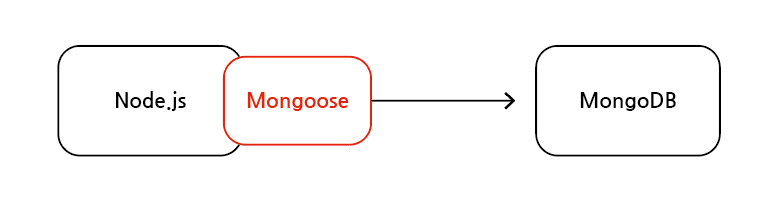
Mongoose를 이용해 데이터 관리하기 위해서는 먼저 schema를 만들고 해당 스키마를 통해 모델을 만듦
즉, Mongoose는 ODM(Object Data Modeling) 라이브러리
Mongoose는 MongoDB를 이용할 때, 필수는 아니며 선택사항
Mongoose 다이어그램
1-1. Mongoose ODM 역할
애플리케이션 계층(Node.js)에서 특정 스키마를 적용
모델의 유효성을 검사
MongoDB 작업을 쉽게 하기 위한 기타 기능
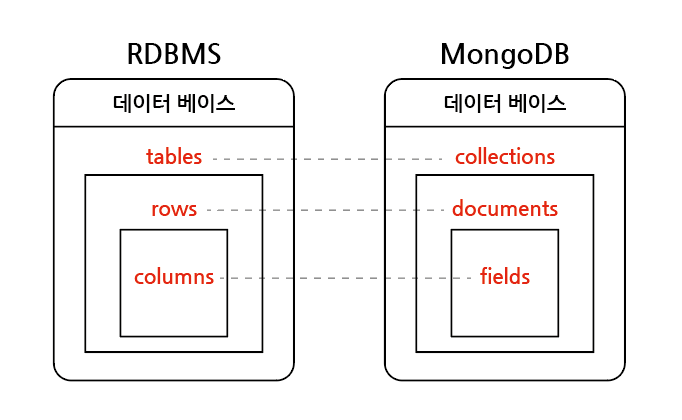
1-2. MongoDB와 RDBMS 비교
RDBMS
MongoDB
데이터 베이스
데이터 베이스
table
collection
row(tuple)
document(BSON)
column
field
index
index
primary key
_id
foreign key
-
BSON : Binary JSON의 의미로 JSON에 ObjectId, Timestamp, Date 등의 정보가 결합
MongoDB 데이터 베이스 명칭
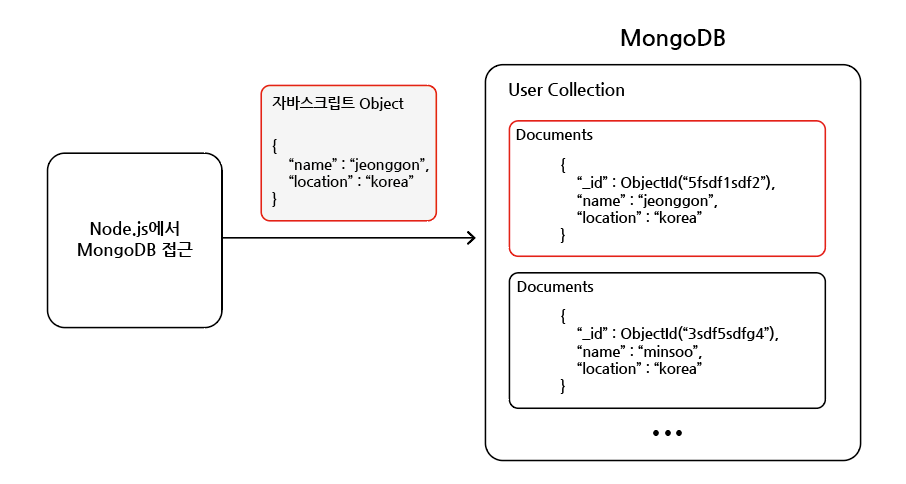
MongoDB 데이터 전송
2. Mongoose 사용 방법
2-1. 스키마 생성
constructor 함수(Schema())를 mongoose에서 제공하여 새로운 스키마를 정의할 수 있도록 함
// 스키마 생성 예시// mongoose 가져오기const mongoose =require("mongoose");// 스키마 생성// 스키마에 들어가는 데이터와 해당 데이터의 타입, 유효성 검사기 등을 설정const productSchema =newmongoose.Schema({name:{type: String,required:true},description:{type: String,required:true},price:{type: Number
}});
2-2. 스키마를 이용해 모델 만들기
model(<모델이름>, <스키마>) 함수로 모델 생성하고 내보내기
// 모델 만들기 예시const mongoose =require("mongoose");const productSchema =newmongoose.Schema({name:{type: String,required:true},description:{type: String,required:true},price:{type: Number
}});// 모델 만들기const Product = mongoose.model("Product", productSchema);// 모델 내보내기
module.exports = Product;
2-3. 모델을 이용해 CRUD 작업 수행
// 데이터 저장 예시// document 저장
Product.create({name:"iphone",description:"latest smartphone",price:150});// 또는// 인스턴스를 생성한 후, save() 메서드를 이용해 저장const product =newProduct({name:"iphone",description:"latest smartphone",price:150});
product.save();
3. schema와 model
3-1. schema
mongoose의 스키마는 문서(document)의 구조, 기본 값(ex. default: 0), 유효성 검사기(ex. required: true) 등을 정의
3-2. model
해당 스키마를 이용해 모델을 만들며 mongoose 모델은 레코드 생성, 쿼리, 업데이트, 삭제 등을 위한 데이터 베이스 인터페이스 제공