


JavaScript DOM
2023.02.24.


DOM
1. JavaScript 실행 환경
- HTML Script 태그
- js 확장자 파일
- 브라우저 콘솔
2. DOM 기본 개념
2-1. DOM
- 웹 페이지(Document)를 구조화된 객체로 제공하며,
프로그래밍 언어가 웹 페이지를 사용할 수 있게연결시킴
2-2. 브라우저가 웹 페이지를 불러오는 과정
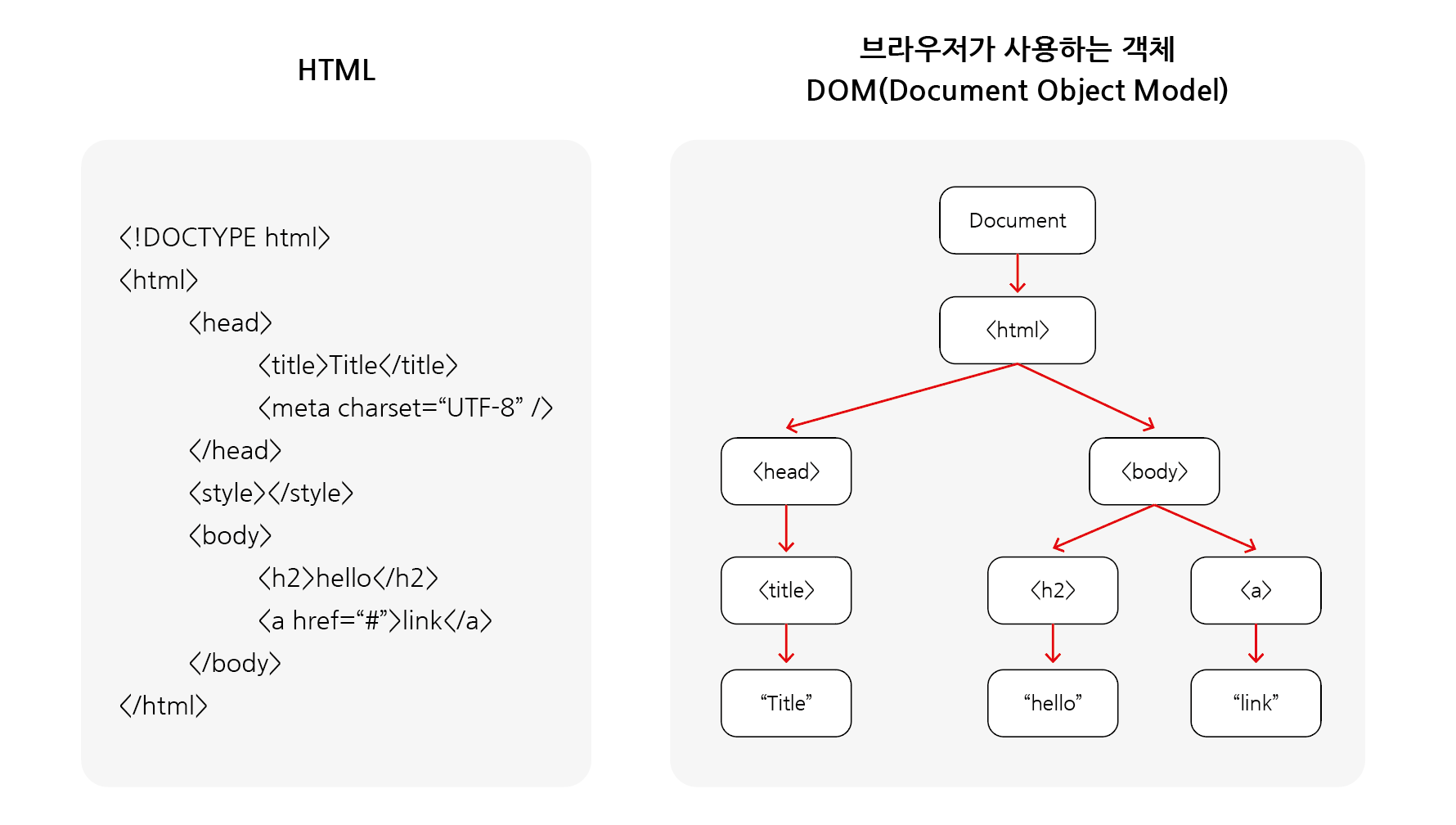
DOM 트리
- 문서(Document)는 웹 브라우저를 통해 해석되어 화면에 나타남
DOM은 이러한문서를 조작하는 방법을 제공하는 API임- 브라우저는 HTML 문서를 해석하여
DOM tree라는 객체의 트리로 구조화함 - DOM에서 모든 요소, 속성, 텍스트는 하나의 객체이며, 모두 document 객체의 자식임
- 웹 페이지를 동적으로 만드는 것은 웹 페이지를 조작(CRUD)하는 것과 같음
- 조작하는 순서는 다음과 같음
- 조작하고자 하는 요소를
선택또는탐색 - 선택된 요소의 컨텐츠 또는 속성을
조작
2-3. ‘document’ object
- 웹 페이지 객체
- DOM tree의 진입점
- 페이지를 구성하는 모든 객체 요소를 포함
- ‘document’ 객체 접근 예시
- HTML의
<title>값 변경하기
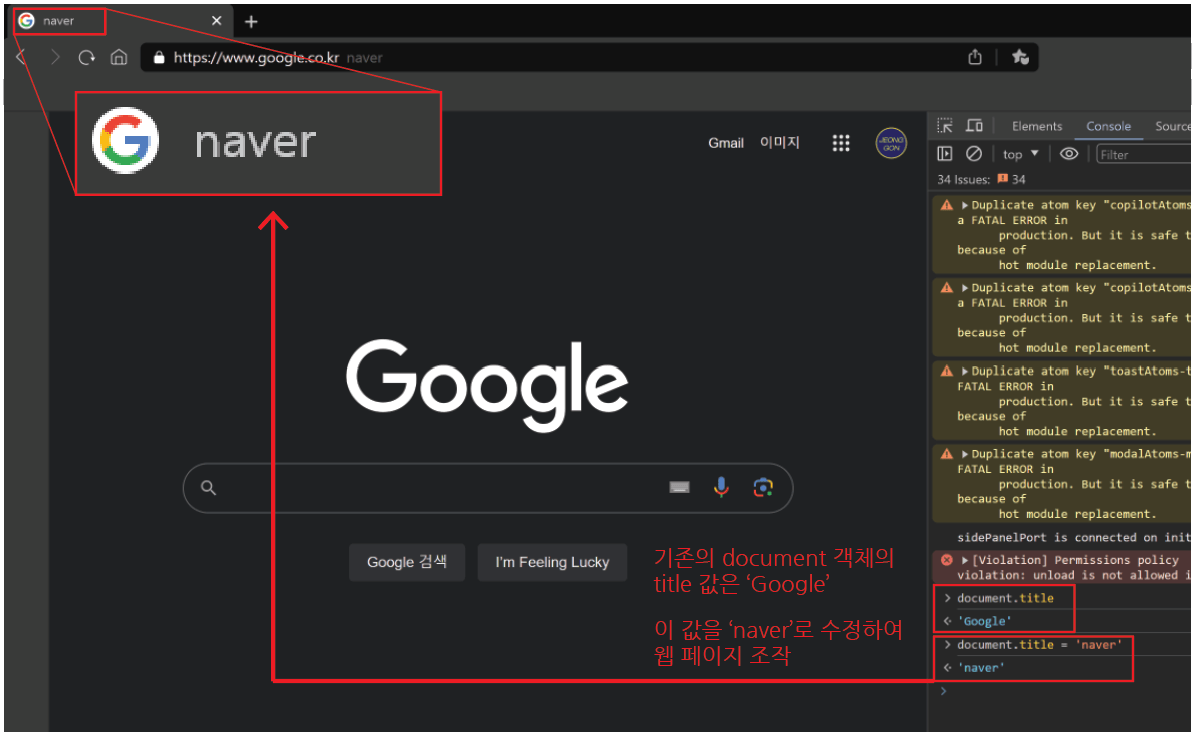
document.title의 점 표기법으로 document 객체의 title 값에 접근하여 수정
3. DOM Query(선택)
3-1. 요소 선택
-
요소 하나 선택 :
document.querySelector(selector)- 제공한 선택자와 일치하는 element 한 개를 선택
- 제공한 CSS selector를 만족하는 첫 번째 element 객체를 반환함(없을 경우, null 반환)
-
요소 여러 개 선택 :
document.querySelectorAll(selector)- 제공한 선택자와 일치하는 여러 element를 선택
- 매칭할 하나 이상의 선택자를 포함하는 유효한 CSS selector를 인자(문자열)로 받음
- 제공한 CSS selector를 만족하는 NodeList를 반환
- DOM 선택 예시
<body>
<h1 class="title heading">DOM 선택</h1>
<a href="http://www.google.com/">google</a>
<p class="text">content1</p>
<p class="text">content2</p>
<p class="text">content3</p>
<ul>
  <li>list1</li>
  <li>list2</li>
</ul>
<script>
  console.log(document.querySelector(".title"));
  console.log(document.querySelector(".text"));
  console.log(document.querySelectorAll(".text"));
  console.log(document.querySelectorall("ul > li"));
</script>
</body>
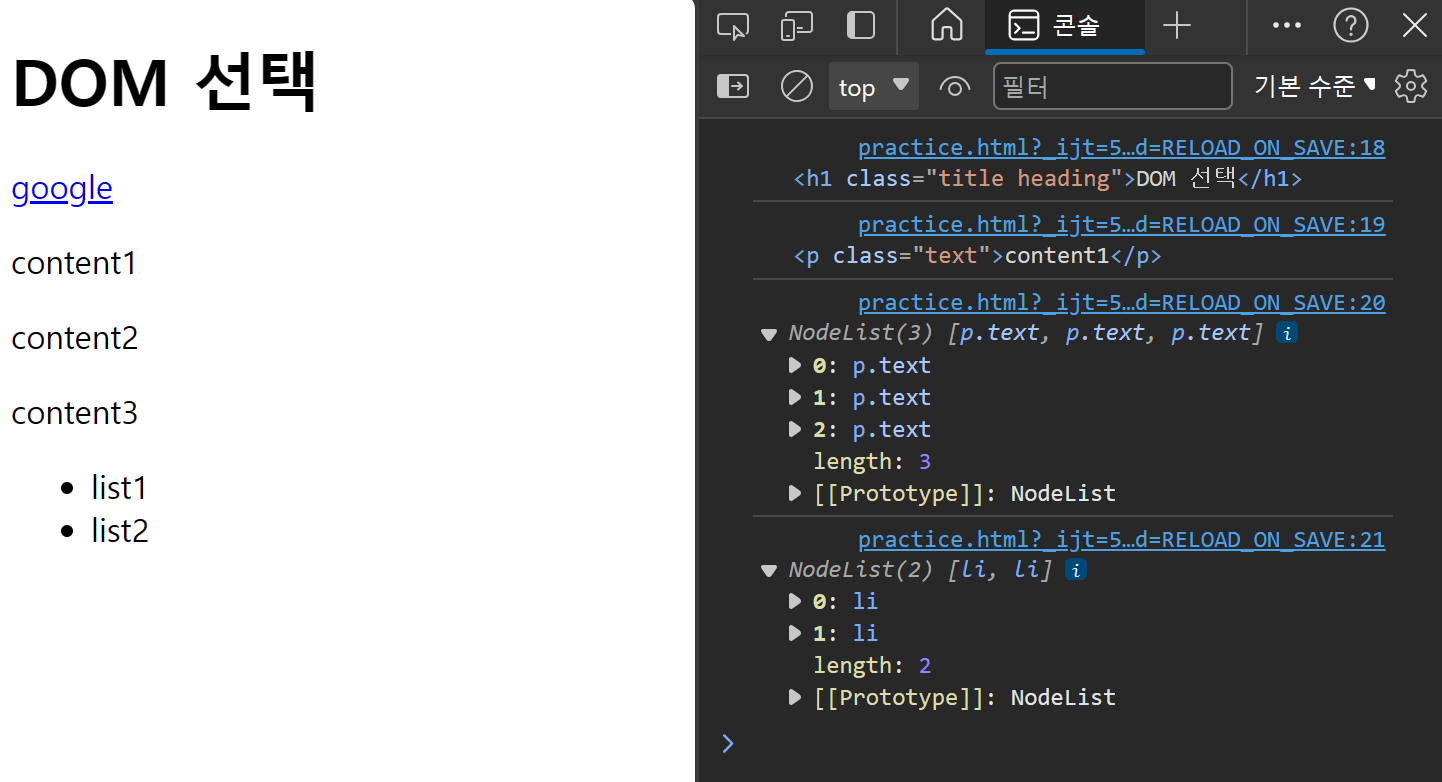
DOM 선택 예시 결과
4. DOM Manipulation(조작)
4-1. 속성(attribute) 조작
- 클래스 속성 조작(‘classList’ property) : 요소의 클래스 목록을
DOMTokenList(유사 배열)형태로 반환 add()와remove()메서드를 사용해 지정한 클래스 값을추가혹은제거element.classList.add(): 지정한 클래스 값을 추가element.classList.remove(): 지정한 클래스 값을 제거
- ‘classList’ property 예시
<body>
<h1 class="title heading">DOM 선택</h1>
<a href="http://www.google.com/">google</a>
<p class="text">content1</p>
<p class="text">content2</p>
<p class="text">content3</p>
<ul>
  <li>list1</li>
  <li>list2</li>
</ul>
<script>
  // .heading의 클래스를 가진 요소를 선택하여 h1Tag 변수로 할당
  let h1Tag = document.querySelector(".heading");
  console.log(h1Tag.classList);

  // 해당 변수의 클래스 리스트에 test 값 추가
  h1Tag.classList.add("test");
  console.log(h1Tag.classList);

  // 해당 변수의 클래스 리스트에서 test 값 제거
  h1Tag.classList.remove("test");
  console.log(h1Tag.classList);
</script>
</body>
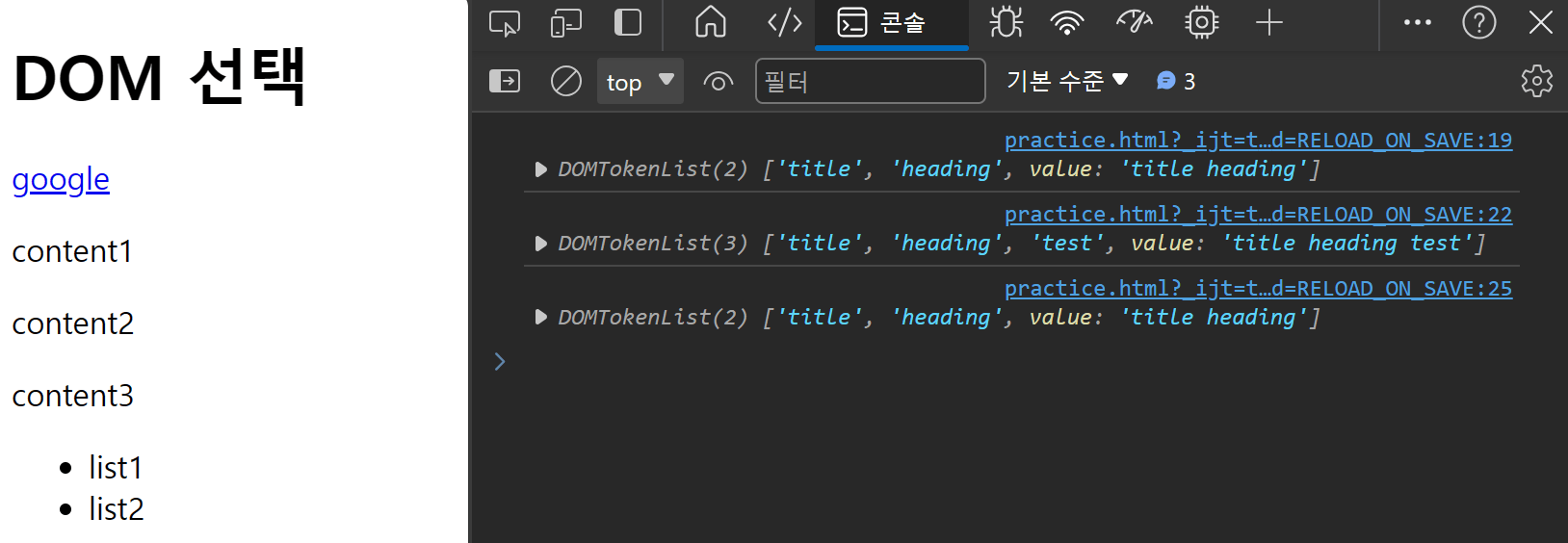
클래스 리스트 예시 결과
4-2. 일반 속성 조작
-
조회하기 :
Element.getAttribute(selector)- 해당 요소에 지정된 값을 반환
-
설정(수정)하기 :
Element.setAttribute(selector, 수정할 값)- 지정된 요소의 속성 값을 설정
- 속성이 이미 있으면 값이 업데이트 / 없으면 지정된 이름과 값으로 새로운 속성 추가
-
삭제하기 :
Element.removeAttribute(selector)- 요소에서 지정된 이름을 가진 속성 제거
- 일반 속성 조작 예시
<body>
<h1 class="title heading">DOM 선택</h1>
<a href="http://www.google.com/">google</a>
<p class="text">content1</p>
<p class="text">content2</p>
<p class="text">content3</p>
<ul>
  <li>list1</li>
  <li>list2</li>
</ul>
<script>
  // a태그의 요소를 찾아 변수 aTag로 할당
  // 변수 aTag의 href 속성의 값 조회
  let aTag = document.querySelector("a");
  console.log(aTag.getAttribute("href"));

  // 변수 aTag의 href 속성의 값을 'https://www.naver.com/'으로 설정
  // 수정된 변수 aTag의 href 속성 값 조회
  aTag.setAttribute("href", "https://www.naver.com/");
  console.log(aTag.getAttribute("href"));

  // 변수 aTag의 href 속성의 값을 삭제
  // 수정된 변수 aTag의 href 속성 값 조회
  aTag.removeAttribute("href");
  console.log(aTag.getAttribute("href"));
</script>
</body>
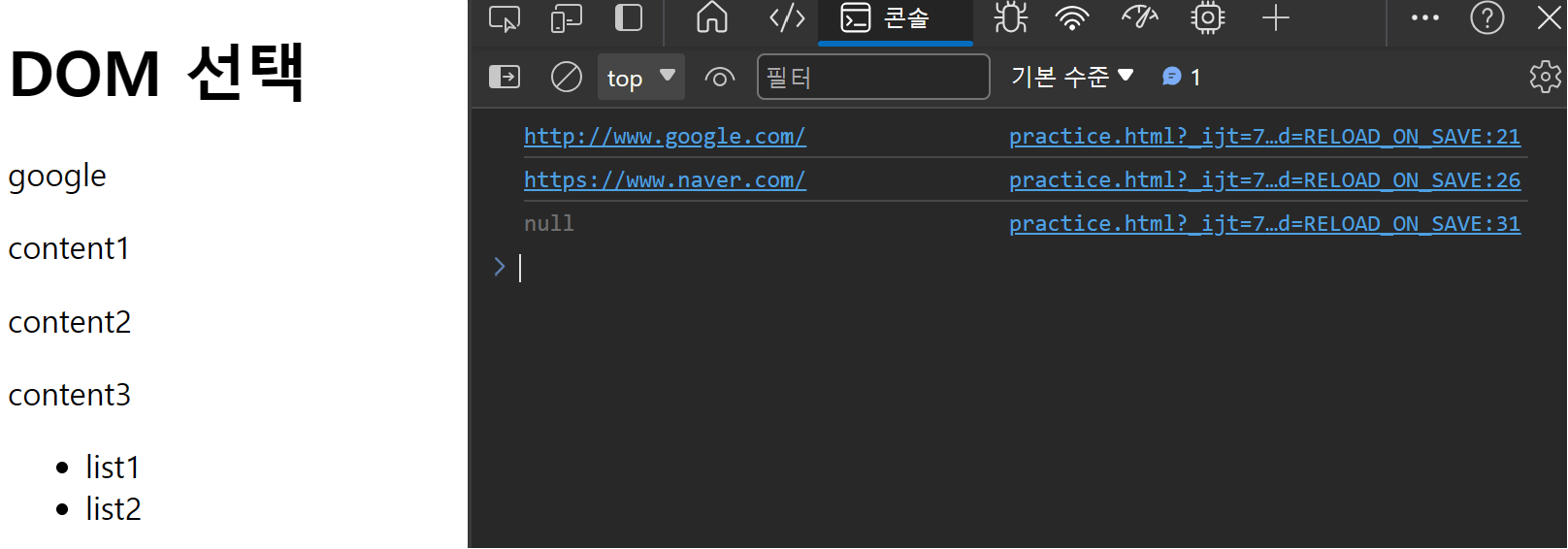
일반 속성 조작 예시 결과
4-3. ‘textContent’ property 조작
- HTML 컨텐츠 조작
- 요소의 텍스트 컨텐츠를 표현
- ex)
<h1>Heading</h1>에서Heading에 해당하는 부분
- ex)
- ‘textContent’ property 조작 예시
<body>
<h1 class="title heading">DOM 선택</h1>
<a href="http://www.google.com/">google</a>
<p class="text">content1</p>
<p class="text">content2</p>
<p class="text">content3</p>
<ul>
  <li>list1</li>
  <li>list2</li>
</ul>
<script>
  const h1Tag = document.querySelector(".heading");
  console.log(h1Tag.textContent);

  h1Tag.textContent = "컨텐츠 수정";
  console.log(h1Tag.textContent);
</script>
</body>
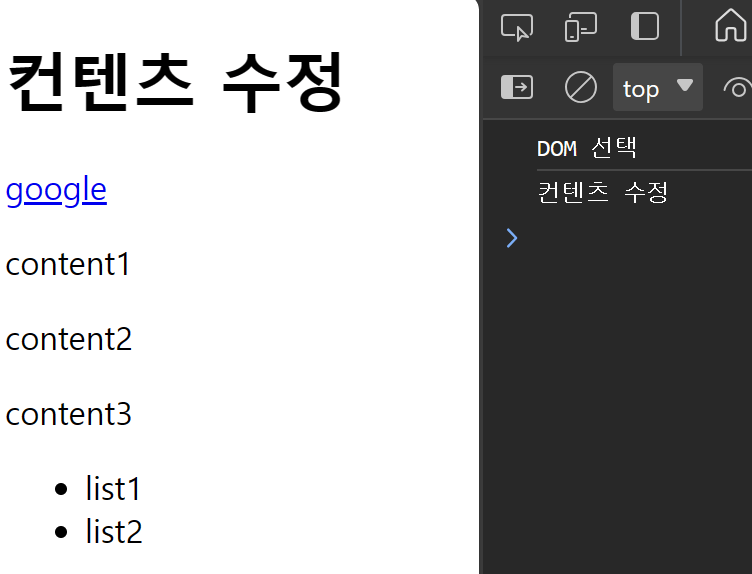
텍스트 컨텐츠 예시 결과
4-4. DOM 조작(생성/추가/삭제)
- 생성하기 :
.createElement() - 추가하기 :
.appendChild() - 삭제하기 :
.removeChild()
- DOM 조작 예시
<body>
<div></div>

<script>
  // 생성
  const h1Tag = document.createElement("h1");
  h1Tag.textContent = "제목";

  // 추가
  const divTag = document.querySelector("div");
  divTag.appendChild(h1Tag);

  // 삭제
  divTag.removeChild(h1Tag);
</script>
</body>
4-5. ‘style’ property 조작
- 해당 요소의 모든
스타일 속성 목록을 포함하는 속성 .style.(스타일)로 접근 가능
- ‘style’ property 조작 예시
<body>
<p>Heading</p>

<script>
  // p태그 요소를 상수 pTag에 할당하고
  // 상수 pTag의 스타일 속성 중 color는 'crimson'으로
  // fontSize는 '3rem'으로 설정
  const pTag = document.querySelector("p");
  pTag.style.color = "crimson";
  pTag.style.fontSize = "3rem";
</script>
</body>
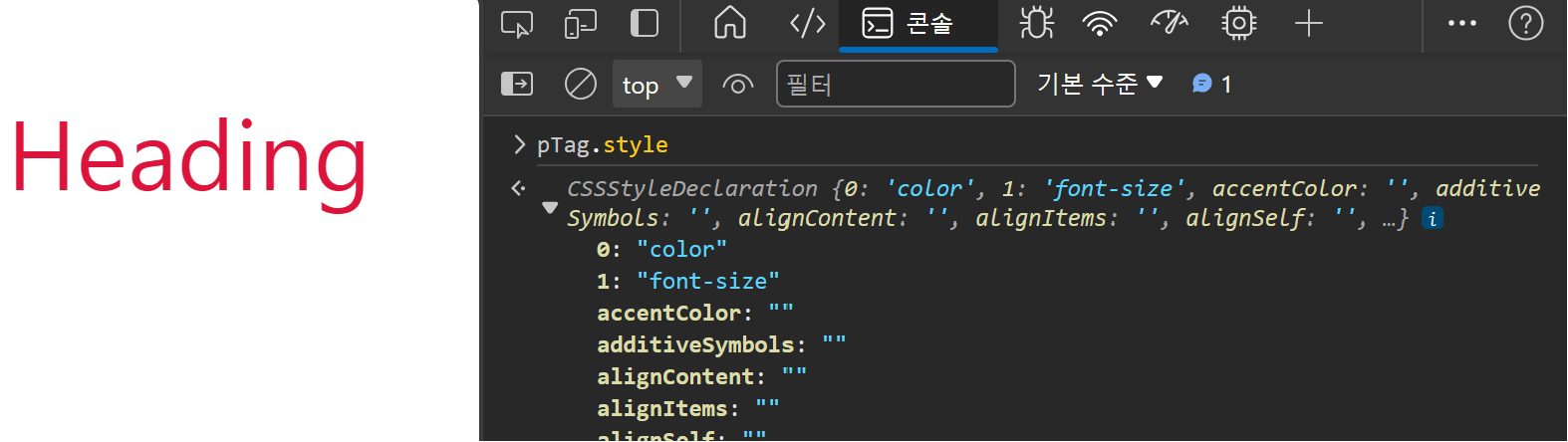
스타일 속성 예시 결과
4-6. 정리
- 속성(attribute) 조작
- 클래스 속성 조작 : classList & add() & remove()
- 일반 속성 조작 : getAttribute() & setAttribute() & removeAttribute()
- HTML 컨텐츠 조작
- textContent
- DOM 조작
- createElement() & appendChild() & removeChild()
- style 조작
- style.(스타일)
5. 참고
5-1. 요소별 DOM property 확인 Tip
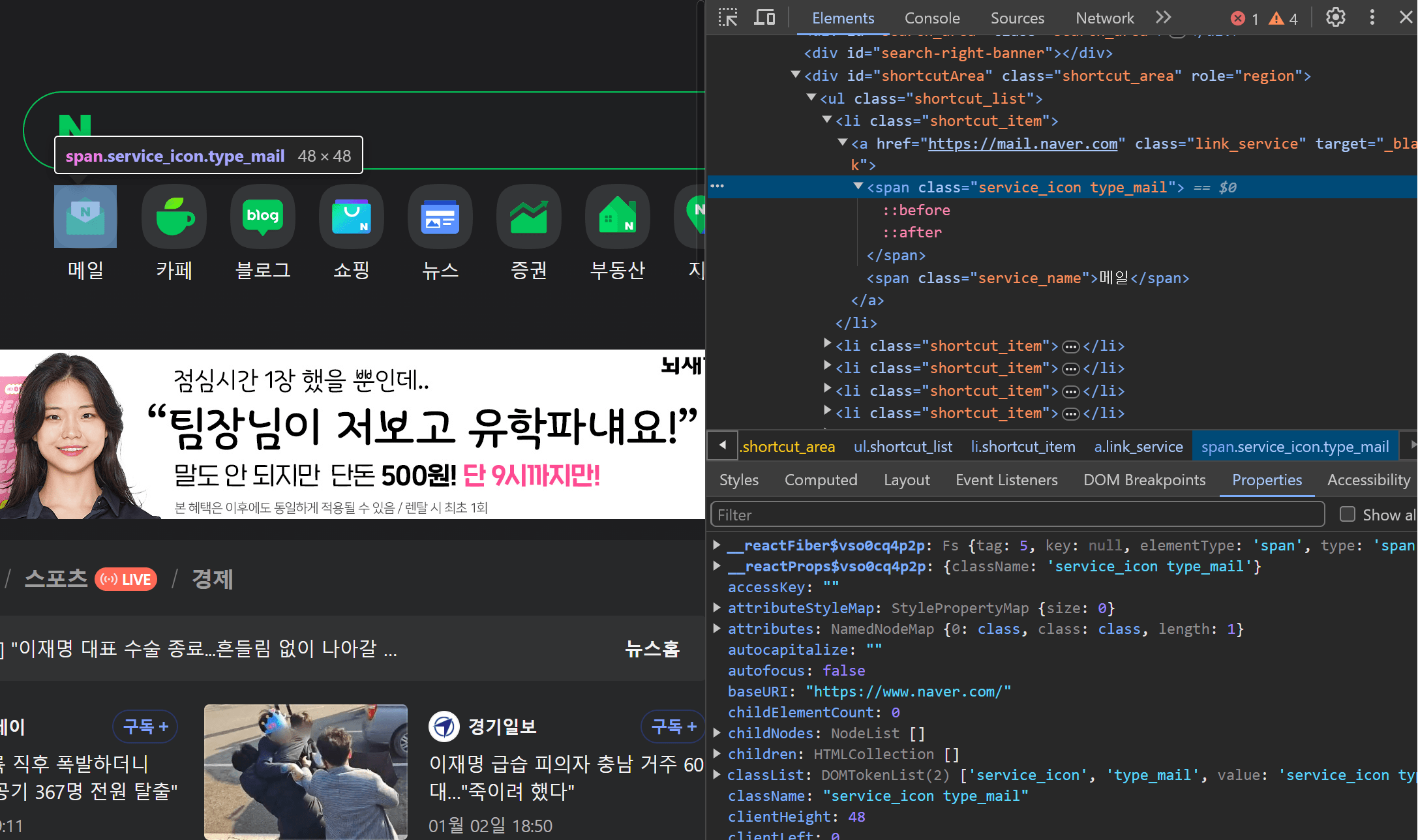
개발자 도구 - Elements - Properties에서 해당 요소의 모든 DOM property 확인 가능
5-2. appendChild()의 특성
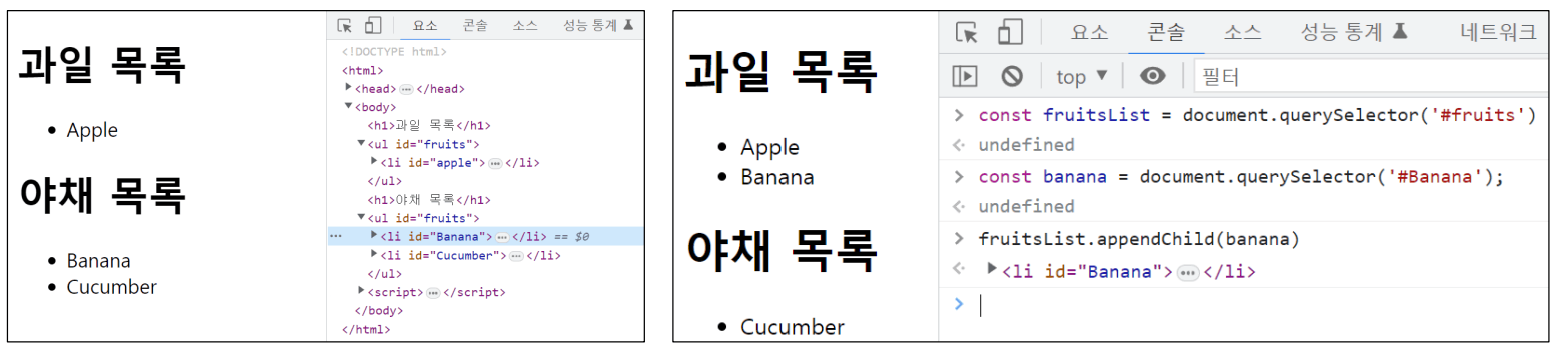
- 이미 문서에
존재하는 요소를 다른 요소의 자식으로 삽입하는 경우, 복사되는 것이 아닌위치를 이동시킴
5-3. Parsing(파싱)
- 브라우저가 문자열을 읽고 해석하여 DOM tree를 생성하는 과정을
파싱이라고 함


조정곤
주니어 프론트엔드 개발자


