


목 차![down-arrow]()


〈
Next.js CSS modules
2024.02.19.


CSS modules
1. CSS modules on Next.js
- Next.js에서 별도의 설치나 설정을 따로 하지 않아도 바로 CSS 모듈을 사용할 수 있음
- 물론 Styled component, tailwind, chakra 등을 사용할 수 있음
1-1. global CSS 파일 생성
- css 파일을 관리할
styles디렉토리 생성 - 해당 디렉토리 내에 전체에 적용할
global.css파일 생성 - global.css 파일을 root인 layout에 import 하기
/*styles/global.css*/

html,
body,
div,
span,
applet,
object,
iframe,
h1,
h2,
h3,
h4,
h5,
h6,
p,
blockquote,
pre,
a,
abbr,
acronym,
address,
big,
cite,
code,
del,
dfn,
em,
img,
ins,
kbd,
q,
s,
samp,
small,
strike,
strong,
sub,
sup,
tt,
var,
b,
u,
i,
center,
dl,
dt,
dd,
ol,
ul,
li,
fieldset,
form,
label,
legend,
table,
caption,
tbody,
tfoot,
thead,
tr,
th,
td,
article,
aside,
canvas,
details,
embed,
figure,
figcaption,
footer,
header,
hgroup,
menu,
nav,
output,
ruby,
section,
summary,
time,
mark,
audio,
video {
    margin: 0;
    padding: 0;
    border: 0;
    font-size: 100%;
    font: inherit;
    vertical-align: baseline;
}

/* HTML5 display-role reset for older browsers */
article,
aside,
details,
figcaption,
figure,
footer,
header,
hgroup,
menu,
nav,
section {
    display: block;
}

body {
    line-height: 1;
}

ol,
ul {
    list-style: none;
}

blockquote,
q {
    quotes: none;
}

blockquote:before,
blockquote:after,
q:before,
q:after {
    content: "";
    content: none;
}

table {
    border-collapse: collapse;
    border-spacing: 0;
}


body {
    font-family: . AppleSystemUIFont;
    background-color: black;
    color: white;
    font-size: 18px;
}

a {
    color: inherit;
    text-decoration: none;
}

a:hover {
    text-decoration: underline;
}
// app/layout.tsx
import "../styles/global.css"- CSS 파일 자체를 import하고 configuration은 하지 않음
1-2. 컴포넌트를 위한 CSS module
- (name).module.css
navigation.module.css파일 생성하기 (.module.css를 이름에 반드시 가지고 있어야 함)classname으로만 생성 (div와 같이 요소 선택자만 사용 불가,.nav div와 같이 클래스 선택자로 시작해야 함)
/*styles/navigation.module.css*/

.nav {
    background-color: red;
}- 해당 파일은 class를 지닌 JavaScript의 객체로 볼 수 있음
- 해당 파일을 컴포넌트에서
styles 객체import 하기 - 스타일 적용 시,
className={styles.(클래스명)}으로 적용
// app/components/navigation.tsx

...
import styles from "../styles/navigation.module.css"

...
return (
  <nav className={styles.nav}>
  </nav>
);
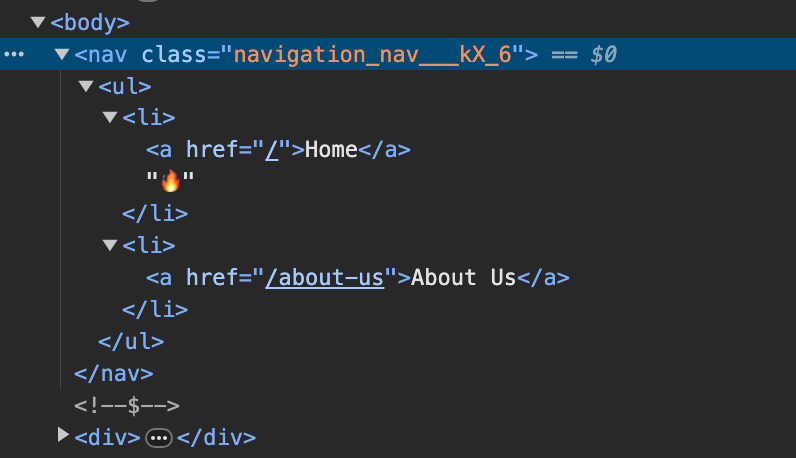
...className="nav"로 적용하지 않는 이유는 global.css 혹은 동일한 이름의 클래스의 스타일을 적용 시, 충돌이 날 수 있음- 하지만 .module.css 파일의 styles 객체를 이용하여 적용하게 되면 아래 이미지와 같이 클래스 속성을 난수(
___kX_6)로 생성하여 적용하기에 클래스 충돌을 피할 수 있음


조정곤
주니어 프론트엔드 개발자


