logo

JEONGGON

    블로그
github
mode
목 차
down-arrow

Webpack Resource Asset

2024.03.21.

post-thumbnail

Resource Asset

1. Resource Asset

  • 대표적으로 이미지 파일들이 있음
  • png, svg, jpeg 파일 등의 에셋을 사용하려할 경우, 에러 발생

1-1. 이미지 사용

- 이미지 파일 준비

  • src/assets/image.jpeg 파일 준비

- HTML 파일 수정

  • 기존 카드 이미지 태그 수정
<!--src/index.html-->

<div class="image">
  <img id="mainImage" alt="main image" />
</div>

- JS 파일 수정

// src/index.js

// 이미지 파일 가져오기
import mainImage from "./assets/image.jpg";

// DOM을 통해 img 태그 src 속성에 이미지 파일 넣기
const img = document.getElementById("mainImage");
img.src = mainImage;

- 빌드 에러 발생

  • npm run build 명령어 실행 시, 에러 발생
  • 이미지 파일 타입을 사용하기 위해 적절한 로더가 필요하다는 에러 메세지가 표시됨
ERROR in ./src/assets/image.jpg 1:0
Module parse failed: Unexpected character '�' (1:0)
You may need an appropriate loader to handle this file type, currently no loaders are configured to process this file. See https://webpack.js.org/concepts#loaders
(Source code omitted for this binary file)
 @ ./src/index.js 4:0-43 8:10-19

webpack 5.90.3 compiled with 1 error in 1100 ms

1-2. 해결하기

- module 설정하기

  • webpack.config.js 파일의 module의 rules에 로더 추가 작성
// webpack.config.js

const path = require("path");
const HtmlWebpackPlugin = require("html-webpack-plugin");

module.exports = {
  module: {
    rules: [

      // 로더 추가
      {
        // 타겟으로 지원할 여러 확장자들 지정
        test: /\.(png|svg|jpg|jpeg|gif)$/,
        type: "asset/resource",
      },
    ],
  }
};

- 빌드하기

  • npm run build로 다시 빌드 진행
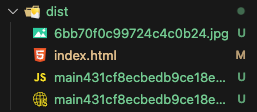
  • 에러 없이 dist 폴더에 이미지 파일까지 번들됨

Webpack_resource_asset
dist 폴더에 번들된 이미지 파일


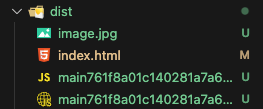
1-3. 에셋 파일 이름 원래대로 출력

  • 번들된 이미지 파일의 이름을 보면 해쉬 값처럼 난수로 표기된 것을 확인 할 수 있음
  • 번들된 에셋 파일들의 이름을 원래대로 나오도록 하기

- output 설정하기

  • webpack.config.js 파일의 output에 assetModuleFilename을 추가 작성하기
// webpack.config.js

const path = require("path");
const HtmlWebpackPlugin = require("html-webpack-plugin");

module.exports = {
  output: {
    path: path.resolve(__dirname, "dist"),
    filename: "[name][contenthash].js",
    clean: true,

    // 해당 설정 추가
    assetModuleFilename: "[name][ext]",
  }
};

Webpack_resource_asset_name
dist 폴더에 번들된 이미지 파일 이름 원래대로 나오게 하기

webpackbundleresourceasset
profile

조정곤

주니어 프론트엔드 개발자

github
linkedin
instagram
email

< 이전글

Webpack Bundle Analyzer

다음글 >

Webpack Babel Loader

Webpack 포스트 (13)

down-arrow
Webpack 소개Webpack importWebpack 폴더 및 파일 구조Webpack Babel LoaderWebpack DevtoolWebpack LoaderWebpack PluginWebpack configWebpack gzipWebpack 개발 서버Webpack 캐싱Webpack Bundle AnalyzerWebpack Resource Asset